Waves Morphoder
Prix£73.64
TVA incl.
Téléchargement instantané
Ce matériel a été vendu
Découvrez du matériel similaire proposé par d'autres vendeurs Reverb
Mis en ligne:il y a plus d'un mois
Vues:211
Suiveurs:5
Offres:1

Chicago, IL, États-Unis
Nos utilisateurs évaluent Reverb
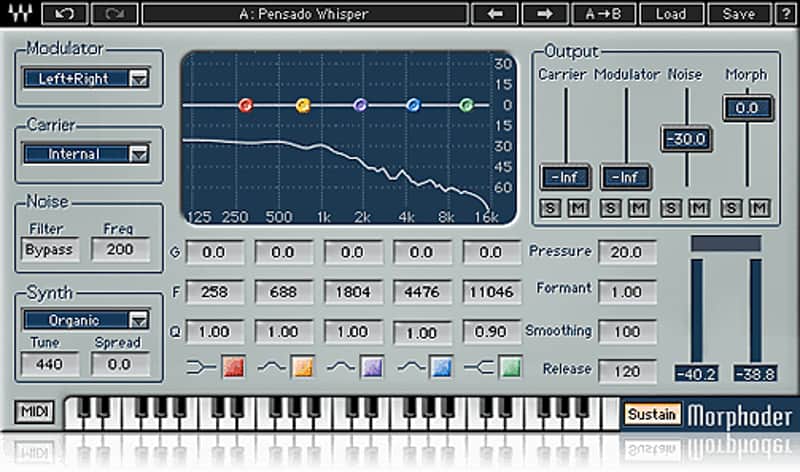
A vocoder for the new age.
What it is:
A contemporary take on the classic vocoder effect.
How we use it:
Combine a voice and guitar tracks together to get a new world of sound design.
Why it's cool:
Add your unique, one of a kind synthesis to any track, making this plugin a huge part of your sound. Waves Morphoder
Taking the classic sound of the original Vocoder synthesizer to new heights, Morphoder lets you combine different audio signals to create wild, unique sounds never before heard, with unmatched clarify and definition.
Features:
Compatibility
Mac:
CPU
Memory
Operating System
Screen Resolution
Support for Visually Impaired Users
Windows:
CPU
Memory
Operating System
Screen Resolution
Installation Instructions
What it is:
A contemporary take on the classic vocoder effect.
How we use it:
Combine a voice and guitar tracks together to get a new world of sound design.
Why it's cool:
Add your unique, one of a kind synthesis to any track, making this plugin a huge part of your sound. Waves Morphoder
Taking the classic sound of the original Vocoder synthesizer to new heights, Morphoder lets you combine different audio signals to create wild, unique sounds never before heard, with unmatched clarify and definition.
Features:
- Takes the vocoder to a whole new level
- 8-Voice stereo synthesizer
- Formant control
- Modulator with Linear Phase EQ
- MIDI control
Compatibility
Mac:
CPU
- Intel Core i5 / i7 / Xeon
Memory
- 8 GB RAM
- 8 GB free disk space on the system drive
Operating System
- 10.10.5 - 10.12.6
Screen Resolution
- Minimum: 1024x768
- Recommended: 1280x1024 / 1600x1024
- USB displays are not supported as the primary display.
Support for Visually Impaired Users
- Mac OS Sierra 10.12.4
- VoiceOver Utility enabled
- Pro Tools 12.7
- Logic 10.3.1
Windows:
CPU
- Intel Core i3 / i5 / i7 / Xeon / AMD Quad-Core
Memory
- 4 GB RAM
- 8 GB free disk space on the system drive
Operating System
- Windows 7 with SP1 64 bit
- Windows 8.1 64 bit
- Windows 10 64 bit
Screen Resolution
- Minimum: 1024x768
- Recommended: 1280x1024 / 1600x1024
Installation Instructions
- Create an account: https://www.waves.com/create-account (if you have an account, skip this step)
- Register the serial number we emailed: https://www.waves.com/account/register
- Download and install Waves Central for Mac | Windows.
- If you already have Waves Central installed, skip to step 4. - Launch Waves Central.
- Windows: via the desktop shortcut or Start Menu > All Programs > Waves.
- Mac: Applications > Waves Central. - Log into Waves Central using your Waves account information.
- Click on Easy Install & Activate.
- Select the products you wish to install & activate on this computer.
- Click on the Install & Activate button.