DiscoDSP OB-Xd Synthesizer
Price£46.47
Incl. VAT
Instant Download
This listing has ended
See similar gear from other Reverb sellers
Listed:over a month ago
Views:12,972
Saves:94

Chicago, IL, United States
Our users rate Reverb
Get your synth on with this wonderfully accurate homage to the famous Oberheim OB series.
What it is:
A stunningly analog synthesizer emulator.
How we use it:
From classic pads to leads, the OB-Xd covers all of the synth bases.
Why it's cool:
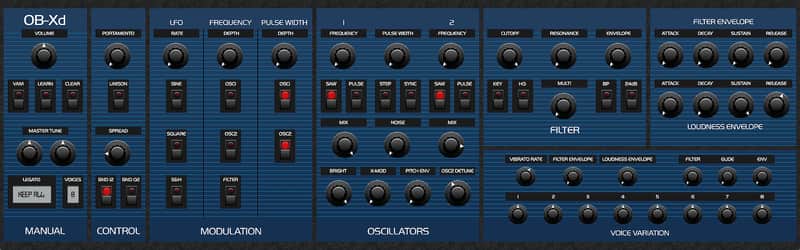
Rarely does a free synth emulator come along that oozes this much vintage vibe. OB-Xd is destined to be a favorite in your plugin arsenal. OB-Xd is based on the Oberheim OB-X. It attempts to recreate its sound and behavior, but as the original was very limited in some important ways a number of things were added or altered to the original design.
The OB-Xd was designed to sound as good and as rich as the original. It implements micro random detuning which is a big part of that sound. However, it was not designed as a self-contained completely independent soft-synth. It needs to be contained within a VST framework where things like transposition, automation, layering, arpeggiation, etc., are available. Also, like many synths of the OB-X's generation, the OB-Xd has no internal effects so its sounds and textures can be greatly enhanced by the use of additional processing like chorus, reverb, delay, etc.
Installation Instructions
What it is:
A stunningly analog synthesizer emulator.
How we use it:
From classic pads to leads, the OB-Xd covers all of the synth bases.
Why it's cool:
Rarely does a free synth emulator come along that oozes this much vintage vibe. OB-Xd is destined to be a favorite in your plugin arsenal. OB-Xd is based on the Oberheim OB-X. It attempts to recreate its sound and behavior, but as the original was very limited in some important ways a number of things were added or altered to the original design.
The OB-Xd was designed to sound as good and as rich as the original. It implements micro random detuning which is a big part of that sound. However, it was not designed as a self-contained completely independent soft-synth. It needs to be contained within a VST framework where things like transposition, automation, layering, arpeggiation, etc., are available. Also, like many synths of the OB-X's generation, the OB-Xd has no internal effects so its sounds and textures can be greatly enhanced by the use of additional processing like chorus, reverb, delay, etc.
About the synth:
While not copying originals, some of the features were taken to a better point. Continuous blendable multimode filter (HP-Notch(BP)-HP in 12 dB mode and 4-1 pole in 24 dB mode). 32 and 64 bit versions included.
Installation Instructions
- Click “Download” on the OB-Xd product page.
- Your browser will begin downloading the OB-Xd zip file.
- Additionally, Reverb will email you a download link.
- After the file has downloaded, unzip the file.
- Open the DiscoDSP OB-Xd Synthesizer folder.
- Drag the Obxd.dll to C:\Program Files (x86)\Steinberg\Vstplugins\
- Drag the Obxd64.dll file to C:\Program Files\Steinberg\Vstplugins\
- Run the installer or drag the Obxd.component to Library / Audio / Plug-Ins / Components.
- Additionally, drag the Obxd.vst to Library / Audio / Plug-Ins / VST.
| Brand | |
|---|---|
| Model |
|
| Categories |
Product safety information may be available here.