Precision Time Align
This listing has ended
See similar gear from other Reverb sellers

Our users rate Reverb
What it is:
A signal synchronizer meant to eliminate any timing or phase issues that emerge on multi-microphone recordings.
How we use it:
Use Precision Time Align to seamlessly remove that washy, out of phase sound from pre-recorded tracks. Precision Time Align also makes it simple to align multi-miked drums or other multi-tracked instruments.
Why it's cool:
The ability to focus recordings at such a fine interval so easily makes Precision Time Align a must-have for any sonic surgeon. Scrub in for Surgery
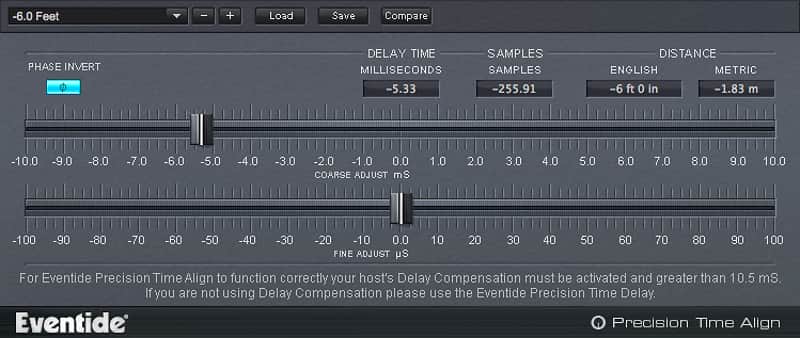
Precision Time Align is a high precision sub-sample delay that can slide a track forward or backwards in time. It will help you get perfectly synchronized double-tracked recordings completely eliminating timing anomalies and phase issues from your mix, especially on multi-miked drums, vocals and instruments.
Blowout Comb
Precision Time Align allows for synchronizing signals to microsecond accuracy, up to 1/64th of a sample. Recording drums, an electric guitar cabinet or vocals with more than one mic can be challenging. While the sound recorded from each microphone might sound good on its own, mixing them together can introduce phase anomalies like comb filtering (phased, hollow sound) or low frequency attenuation. Editing in your D.A.W. can help with time-alignment on a sample level, but Precision Time Align is 64x more efficient.
Whether you wish to combine multiple tracks of a single instrument, compensate for phasing from different mics on a kick drum, or align audio segments for a tracking-only session, Precision Time Align is ideal for these critical engineering tasks.
- Synchronize signals to microsecond accuracy, up to 1/64th of a sample.
- Phase Invert button fixes mirror-image acoustical phasing.
- Precise Coarse and Fine controls optimize time shift in recordings.
- Perform negative delays, moving the track up in time relative to other tracks in the recording.
- Four different methods for calibrating the signal to achieve perfect signal matching.
- Precision Time Delay also included for use with D.A.W.s lacking delay compensation.
- Much faster and more accurate workflow than trying to manually align in your D.A.W.
Compatibility
Precision Time Align is compatible with any of the following Digital Audio Workstations running on either Microsoft Windows 7+ or Apple OS X 10.7+
- Pro Tools 10+ (AAX Native)
- Cubase 7+ (VST)
- Nuendo (VST)
- Wavelab (VST)
- Logic 8+ (AU)
- Ableton Live 7+ (AU, VST)
- Sonar (VST)
- Studio One (AU, VST)
- Digital Performer (AU)
- Reaper (VST)
- GarageBand (AU)
Installation Instructions
Installing and Authorizing Plug-ins -
Before You Begin:
You will need to provide three pieces of information to complete the authorization and installation process:
iLok.com User ID & License Manager- If you don’t have an ilok.com account, you can create one for free by visiting iLok.com
- Download and install the free iLok License Manager to activate and manage your plug-in licenses.
- If you don't have an Eventide account, Click here to Register.
- A confirmation email will be sent after completion. If you don't see it, check your spam folder.
The Serial Number will be two letters followed by 6 numbers (i.e SR-######). The License Key will be 3 sets of 4 characters, a letter or a number, each; like XXXX-XXXX-XXXX.
- Register your plug-in using your Eventide account, iLok user ID, serial number and license key.
- Find your plug-in license in the iLok License Manager and activate it on your computer.
- Download the plug-in installer and run it on the same computer as your DAW and iLok License Manager.
- Launch your DAW. If you do not see the plug-in, you may need to rescan.
What's new?
2.2.2
-Various internal improvements and bug fixes
2.1.8
-Updated User Guide for clarity
-Various bug fixes and improvements