
Sample Magic Magic AB
Prix$68.35
Téléchargement instantané
Cette annonce est terminée
Découvrez du matériel similaire proposé par d'autres vendeurs Reverb
Mis en ligne:il y a plus d'un mois
Vues:1 096
Ajouts aux favoris:11

Chicago, IL, États-Unis
Simple, Elegant, Mix Reference Utility.
What it is:
Fast and accurate audio comparison tool.
How we use it:
Quickly compare multiple audio streams.
Why it's cool:
Three unique reference modes allow for a streamlined process regardless of your workflow. A simple, powerful reference tool that allows you to switch between the audio you are working on and up to nine tracks in an instant.
With A/B referencing playing an essential part in production, mixing and mastering, AB offers an infinitely faster, easier and more accurate method to compare multiple audio streams to those currently available in any DAW.
Magic AB sits on the mix bus (or individual channels), allowing instant switching between your current project and reference material in pristine, transparent quality, regardless of the processes already on the mix bus. If required, plugins can be added post Magic AB to provide a sounding-point for programme material with or without additional processing.
Magic AB includes a host of new features and powerful workflow improvements including two new referencing modes, up to four programmable Cue and Loop points per track, RAM-bypass mode, drag and drop files, Mono/Stereo switching and much more.
Features:
Compatibility
Magic AB is not yet compatible with Mac OS High Sierra.
Windows
Installation Instructions
PC
What it is:
Fast and accurate audio comparison tool.
How we use it:
Quickly compare multiple audio streams.
Why it's cool:
Three unique reference modes allow for a streamlined process regardless of your workflow. A simple, powerful reference tool that allows you to switch between the audio you are working on and up to nine tracks in an instant.
With A/B referencing playing an essential part in production, mixing and mastering, AB offers an infinitely faster, easier and more accurate method to compare multiple audio streams to those currently available in any DAW.
Magic AB sits on the mix bus (or individual channels), allowing instant switching between your current project and reference material in pristine, transparent quality, regardless of the processes already on the mix bus. If required, plugins can be added post Magic AB to provide a sounding-point for programme material with or without additional processing.
Magic AB includes a host of new features and powerful workflow improvements including two new referencing modes, up to four programmable Cue and Loop points per track, RAM-bypass mode, drag and drop files, Mono/Stereo switching and much more.
Features:
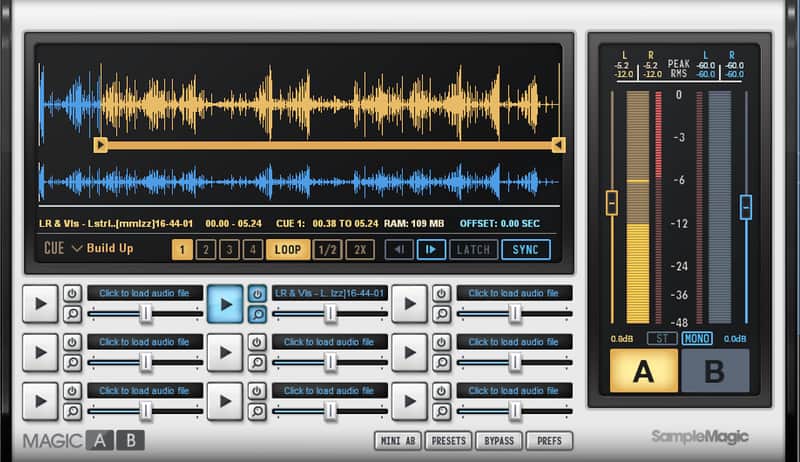
- Perform instant AB references: compare the track you are working on in your DAW with any commercially produced reference track in a variety of audio formats (mp3, Aiff, Wav, m4a, AAC). Like the sound of a reference? No problems – drag/drop your chosen reference track/s into Magic AB then flick between them and your mix with a single mouse click.
- Three unique referencing modes: Sync to compare your current mix with older versions – a mastering must; Latch to follow the DAW timeline; and Manual for freeform referencing.
- Hone in on the details: cue the reference track from the precise point you want to hear and loop the section you want to focus on. New with V2: save up to four cue/loop points per track and work in detail with the all-new zoom. Compare multiple mixes quickly and simply: create and save ‘go-to’ playlists to radically speed up mixing and mastering.
- Balance the relative volume of mixes with extensive, accurate, easy-to-read metering (peak, RMS and crest values with adjustable peak fall time). The clear, ergonomically designed GUI with bold waveform display means you’re always comparing like with like. Compare stereo mixes or flip to mono to check mono comptability.
- Give your ears a chance to recalibrate with manually changeable crossfade times. Flip in an instant, or allow a transitions of up to 2000ms. Do it all 'in mini' with Mini AB - the same powerful feature set at a tenth of the size: ideal for those using smaller screens.
Compatibility
Magic AB is not yet compatible with Mac OS High Sierra.
Windows
- Windows Vista or higher (tested up to Windows 10)
- SSE2-enabled processor (Pentium 4 or later)
- Minimum 2GB RAM.
- Any VST / Audio Unit (32/64-bit) / AAX-compatible host software.
- Mac OS X 10.7 or higher (tested up to 10.10 El Capitan)
- Intel processor Mac
- Minimum 2GB RAM.
- Any VST / Audio Unit (32/64-bit) / AAX-compatible host software.
- WAV and AIFF up to 24-bit / 96kHz, mp3, m4a, AAC
Installation Instructions
- Create a Sample Magic account.
- Visit the Magic AB product page here.
- Add Magic AB to your cart.
- Go to your cart.
- Under 'enter discount code,' enter the code emailed to you via Reverb.
- Click 'apply discount' to register your product.
- You can then download Magic AB under 'My Plugins' here.
- Double-click on the file ‘MagicAB v2.mpkg.zip’. This unpacks the zip into the installer file.
- Double-click on the file ‘MagicAB v2.pkg’. This starts the installer which will guide you through the process. Click continue to start the install.
- Click continue to start the install then select the destination drive.
- The standard install will install all plugin formats. If you wish to customise the install, select the formats you wish to install. Click ‘Continue’.
- If you wish to install to a custom directory click ‘Change Install Location’.
- Click ‘Install’ and enter your password if applicable.
- The software is now installed. Click ‘Close’ to finish.
PC
- Choose the 32-or 64-bit version and double-click the Zip file to expand.
- Double-click the .exe file to launch the installer.
- The setup wizard will guide you through installation. Click ‘Next’ to continue.
- Select a format to install: VST and/or AAX.
- Choose an install location and click ‘Install’ to continue.
- The installer will now install the plugin.
- Click Finish to complete installation.
| Marque | |
|---|---|
| Modèle |
|
| Catégories |
Des informations concernant la sécurité des produits peuvent être disponibles ici.