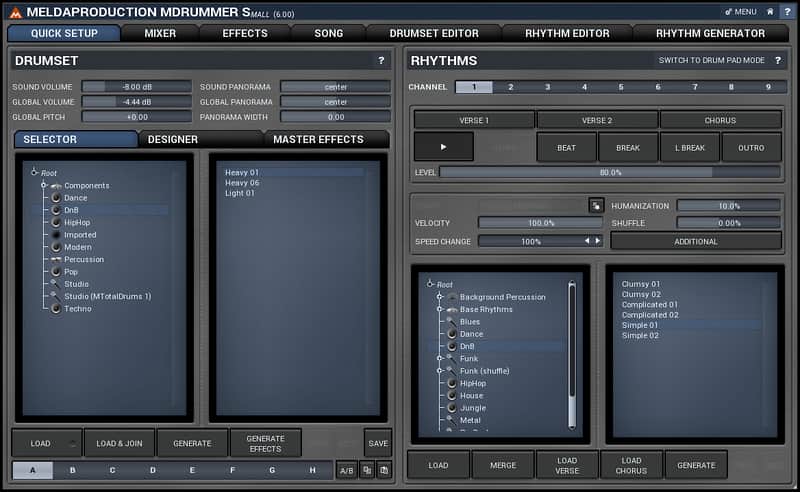
MDrummer Small
Este anuncio ha terminado
Ver equipos similares de otros vendedores de Reverb

Nuestros usuarios valoran Reverb
What is is
A drum machine/virtual drummer containing over 500mb of samples.
How we use it
Provide the structural backbone of the song via real time performances or a series of programmed loops.
Why it's cool
The combination of sound quality, and the human feel of the virtual drummer makes MDrummer Small a key production and songwriting tool. From Melda Production:
MDrummer Small is the little brother of the MDrummer Large - the ultimate drum machine and virtual drummer.
MDrummer Small may be tiny compared to the full version, but it still lets you create great drum tracks quickly and is completely free. It comes with 500 MB of samples, multisamples, rhythms and other data, which could satisfy many home musicians. It also contains the demo version of MDrummer Large, where you can check out the features of the big beast.
Compatibility
Windows
- Windows XP / Vista / 7 / 8 / 10 (32-bit or 64-bit)
- VST / VST3 / AAX compatible host (32-bit or 64-bit)
- Intel/AMD processor with SSE2 support
Mac
- OS X (10.6 and newer, 32-bit or 64-bit)
- VST / VST3 / AU / AAX compatible host (32-bit or 64-bit)
- Intel/AMD processor with SSE2 support
- AU note: in some hosts, the GUI is not shown for the first time, if so, then please just restart the host.
Linux is not directly supported, but it is apparently possible to run the plugins via Wine. Before installing you have to make sure that your ".wine/drive_c/windows/Fonts/" directory is populated with Microsoft True Type Fonts (which is generally available as a package on Linux distributions).
Installation Instructions
General Instructions:
- We auto-detect your computer operating system, so just click the download button above
- Find the downloaded plugin (it’s in your computer’s download folder) and double click it
- A plugin installer window will open, so go through the installation process
- We will also send you an email with a link to re-download in case you need it
How to install plugins in Ableton Live:
- If Ableton is closed, open it and skip to #5
- If Ableton is already open, go to Preferences
- Go to Files & Folder
- Click “Rescan plugins”
- Find the plugin in the Ableton plugins folder in the sidebar
- Drag-and-drop the plugin onto your track at the bottom of the screen
- Open Logic Pro X
- Create a software instrument track if you downloaded a virtual instrument plugin
- Under Default Patch, go to AU Instruments and choose the plugin you just installed
- If you downloaded an effect or utility plugin, you can insert them on the mixer
- Click the Track menu and create a new track
- Select any of the available inserts
- Go to Multi-Channel plugins, then Instruments to find your new virtual instrument plugin
What's new?
6.04 changes
- Huge memory (and partly CPU) optimizations.
- Added MPhatik FX.
- MWaveFolder FX scope can now be collapsed to simplify the display and save CPU.
- Various GUI improvements.
- Added Sync to all time parameter's text edit windows.
- All parametric equalizers now feature L/R (or M/S) processing for all bands.
- Cursors now follow HiDPI/Retina.
- Convolution IR library extended.
- MLoudnessAnalyzer FX now provides Target LUFS and Limit parameters and displays units.
- Fix: Loading expression in MUtility using presets didn't update the text in the editor.
- Fix: MDrummer could make Cubase crash on startup or exit in some random conditions.
- Fix: Style wizard could crash Wavelab and VE on OSX.
- Fix: Resizing using left & top corners of popup windows didn't work.
- Fix: Reinstallation could lead to duplicate presets in certain situations.
- Fix: Range in MFreeformEqualizer and MFreeformAnalogEq might not have updated the axes immediately.
- Fix: Send channel & volumes weren't stored.
- Fix: When resizing loop editor couldn't be fully zoomable.
- Fix: MDrummer didn't correctly follow non-random loops for beats.
- Fix: First bar could have been omitted after a loop in the host with multiple bars.
- MDrummer Large is now available as 15 days trial.
- Added MWaveFolder and MOscilloscope effects.
- Added support for HDPI on Windows and Retina on OSX.
- Improved support for systems with mutliple displays.
- Added tempo/time-tap feature to all controls of tempo or frequency - hold alt and left click and release to set the value.
- Sonograms heavily optimized for CPU, GPU and memory.
- Added info to all bar graphs for harmonics etc. such as for harmonics in all oscillators.
- Loudness meters redesigned - they now show green area "below" the target level, so that once it exceeds the target level, it is clearly marked red.
- Improved VST3 compatibility with Reaper.
- Added dry/wet to MAmp.
- Added 4 guides to all time graphs, which you can use for visualisation purposes.
- Removed "AAX (UI)" postfix from ProTools menu, it might be needed to clear PT's cache.
- Added -100%..100% units to all time graphs.
- Added LU meter option to make the green area -1..+1 LU as it was before.
- Added Pre/Post option for equalizer in MReverb.
- MReverb FX now disables late reflection processor when late is at 0% saving up to 70% CPU.
- Style wizard is now smaller.
- Fix: Analyzer settings were too big in knobs mode.
- Fix: Sonograms caused serious memory leaks.
- Fix: Fixed hypotetical possibility of calculation errors in some plugins.
- Fix: Fixed a few hypotetical problems.
- Fix: Clearing points of a graph after a step sequencer delete all points even if there were mandatory 2.
- Fix: LP/HP filters in dynamic equalizers (and plugins containing a dynamic eq) didn't reset correctly on panic/reset.
- Fix: Improved support with El Capitan.
- Fix: Knobs were not resizing correctly for sizes <100%.
- Fix: Rhythm editor / Advanced / Generate from template / Generate template didn't work.
- Fix: Shift + Click on randomize button for effects to undo last randomize didn't work.
- Holding Ctrl while pressing Layer button in Drumset designer now forces it to generate an FX layer.
- Holding Ctrl while pressing Randomize button in Drumset designer now adds the new component instead of replacing it.
- Moving equalizer bands now shows all basic parameters about the band next to it.
- Added "Maximum - Average" graph for all analyzers, which lets you investigate the dynamics of the material.
- Normalize feature in all analyzers now performs at most +60dB gain increase, which is better when analyzing audio with silent segments.
- Infinite averaging analyzer now ignores places with level below -80dB (spectrally).
- Added "Integral curvature" switch to all envelopes.
- MDrummer now lets you search for samples if they are missing.
- Text input now accepts ',' as decimal mark.
- Fix: Compatibility with OSX 10.11.
- Fix: Sample library analyzer created crash components containing also splash and chinese cymbals.
- Fix: Sample library analyzer couldn't be cancelled.
- Fix: Moving drums in the drum list didn't work properly.
- Fix: Favourites in directory selectors didn't work if desktop or any other standard directory has been selected before.
- Fix: Stereo scope wasn't visible in some color combinations.
- Fix: Drumset designer didn't update after drumset load when displayed in popup.
- Fix: Some FX didn't correctly generate subsections.
- Added MBitFun FX.
- Added virtual components ability, available from Global settings.
- Added 60% and 300% style size options, for those with extremely low or extremely high resolutions.
- Added border-opacity control for areas in all equalizers.
- Added "keyboard" areas to all equalizers.
- MDrummer can now automatically search for its factory data library.
- MSampler & MScrather now searches into global file system for samples even if Custom sample path has been selected, just in case the custom sample path has been changed.
- Drag & drop in the drumset editor is now possible into the drum list as well as the drum source.
- Fix: Some subsystems (e.g. loop generator) might have start point to nonexistent directories if MDrummer factory folder has been completely moved.
- Fix: Installer / plugins could crash if there were no fonts on the operating system instead of showing an error message.
- Fix: MSubSampleSynth Generate might have not worked for some samples depending on the location.
- Oscillator shape "saw" (between "rectangle" and "full saw") has been replaced by "rect-saw" as this makes more sense and avoids audio quality degradation due to eliminated DC offset.
- Improved response of MReverb when predelay specified and source is highly on the right. Change has been made for the sake of better audio quality.
- 64-bit standalone version on Windows has been removed to save space.
- Added Favourite paths feature to all file dialogs and selectors.
- Added new Online Preset Exchange accessible directly from each preset window, which now submits one of your presets in exchange for the whole online database, to support community preset sharing.
- Added pitch parameter to notes.
- ADSR tremolo settings are now available even in custom shape mode.
- Added Basic GPU acceleration mode, which provides basic acceleration even for older incompatible GPUs.
- Added "Enable keyboard input" option, enabled by default, which lets you disable all keyboard input for main plugin editors (not popups) if collides with your host.
- Saved drumset archives now contain paths to files in more compact way, so that the whole tree is not replicated when the archive is imported.
- MSampler, MMultiSampler and MSynthesizer4NN delay parameter has now a scaled units which makes it easier to adjust delays around 0ms.
- Improved threshold editor in MCompressor and MDynamics.
- Added linear-shape line to MCompressor dynamic shape.
- Minor improvements to several styles.
- Added "Tremolo continues in release stage" to all ADSR envelopes.
- MConvolution initialization heavily optimized.
- Added ability to store presets in all time-graph settings.
- Added customisable graying for inactivate windows, which makes it easier to recognize active windows.
- Improved multicolumn listbox behaviour (in presets for example).
- Added band RMS length & Hold to MDynamicEq.
- Copy & paste (all of them) is now copied as text, so you can easily use this to send settings over email for example.
- Plugin editors with tabs now remember selected tab.
- Added "Follow sustain level" feature to ADSR tremolo.
- Added MWobbler FX.
- MIDI input & output filter settings are now displayed nonmodally.
- Scrolling using mouse-wheel in loop editor now scrolls vertically only if ctrl key is held or the cursor is in the track list, otherwise it scrolls horizontally.
- Increased text resolution for frequency parameters.
- Added "Off" option for LP/HP orders.
- Fix: Equalizer auto-listen feature caused the filters to stay in "listen" mode until moved again or panicked.
- Fix: Time graphs could miss maximum.
- Fix: Cmd+C/V didn't work on Mac OS X.
- Fix: Preset manager sometimes did scrolled illogically in auto-open mode if there were lots of folders.
- Fix: MReverb could start self-oscillating in very specific settings.
- Fix: The plugins now override a bug present in a few hosts, which closes style settings after a style has been changed.
- Fix: Some windows were incorrectly decreasing their size when certain panels have been collapsed.
- Fix: Stereo scopes were mirrored horizontally.
- Fix: Quick setup / Master effects / Generate disabled the Undo button instead of enabling it.
- Fix: Quantize menu didn't have correct number of columns.
- Fix: Loop editor selection terminated by rewind could lead to notes being selected, but not accessible by selection.
- Fix: Custom shape/step sequencer/advanced editors didn't work in MSynthesizer4NN.
- Fix: If multiple song strctures channels have been used, the position locator followed the first one only.
- Fix: MDrummer didn't scroll to selected MIDI keys on Drumset editor page.
- Fix: MGranular FX could crash.
- Fix: Changes to drum sources could lead to unstable situations.
- Added new Ozone style.
- Improved file selection dialogs workflow.
- Added ability to mark favourite presets.
- Added Show favourite, Load next and Load previous features to preset window.
- Clicking a track in a loop editor selects the associated drum in the drumset editor.
- Note properties & quantization can now be hidden.
- Added ability to drag & drop presets to a different folder.
- Custom sample is now stored only with a signal generator only if the custom sample rate is now 0 to smaller the settings size.
- Confirmation dialogs for deleting/replacing presets and preset folders now contain name of the item.
- Optimized signal generator harmonic mode custom sample analyzer, which now saves the analyzed harmonics, so that it is usable even if the target sample is not available.
- Added ADSR tremolo sync and random initial phase features.
- MConvolution now stores the resampled IRs, so that it doesn't need to resample it again next time.
- Added preset search feature.
- Increased time-graph resolution to 1 second.
- Presets are now cached for faster access.
- Preset window is not closed when clicked outside of it anymore.
- Fix: Installation other than to the default path might have not samples and other resources available and even MDrummerConfig wouldn't fix that.
- Fix: Certain preset modifications may have maked the smart randomizer work incorrectly until the plugin gets reinstalled.
- Fix: Preset buttons < > didn't work if there were duplicities in the current preset folder, preset dialog now automatically resolves the duplicities.
- Fix: Denormals could occur in several situations causing high CPU use.
- Fix: Fonts couldn't be loaded on some rare Mac OS X machines making the software unusable.
- Fix: Some envelope editors were displaying incorrect units when dragging items.
- Fix: Numpad characters (except for numbers) couldn't be entered on Mac.
- Fix: Granular transformation menu was showing incorrect values.
- Fix: Improved compatibility with some ancient Windows XP versions, which do not contain some basic system folders.
- Fix: When changing rhythm channel in the quick setup, the associated rhythm hasn't been selected.
- Fix: Tabs in drum sources are not available as popups anymore, because these were dysfunctional.
| Marca | |
|---|---|
| Modelo |
|
| Categorías |
La información de seguridad del producto se encuentra disponible aquí.