
Sample Magic Boost Pro
Prix$82.08
Téléchargement instantané
Cette annonce est terminée
Découvrez du matériel similaire proposé par d'autres vendeurs Reverb
Mis en ligne:il y a plus d'un mois
Vues:746
Ajouts aux favoris:7

Chicago, IL, États-Unis
Powerful, Effective, Mix Buss Processing.
What it is:
Cutting-edge multi-effect from Sample Magic.
How we use it:
Dial-in high-quality distortion, multi-band compression, 4-band EQ, brick-wall limiting, and more.
Why it's cool:
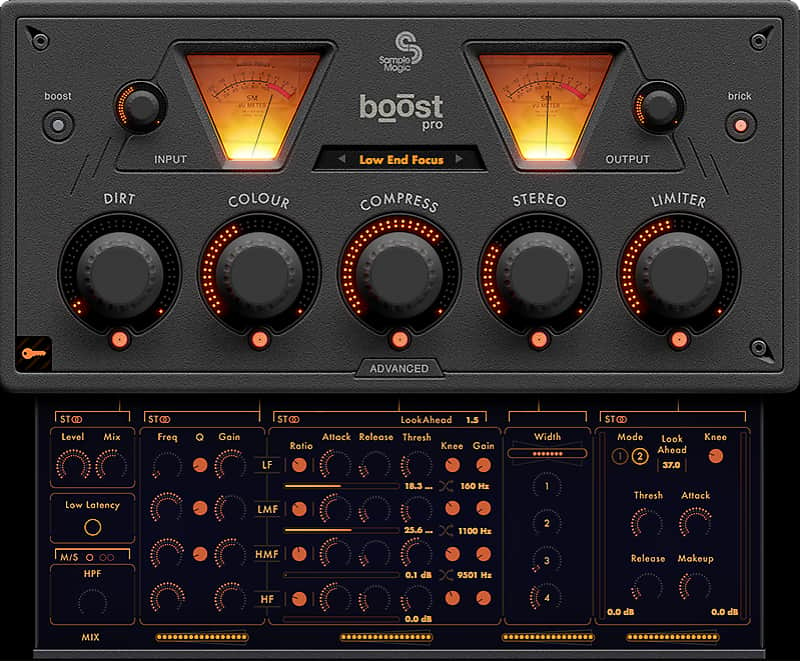
With every module possessing a mid/side processing option, low-latency mode, RMS metering, and CPU-optimized performance, Boost Pro is a true sonic multi-tool. Utilizing cutting-edge low-latency DSP, Boost Pro provides distortion, multi-band compression, 4-band equalization, stereo enhancement, brick wall limiter and hi-pass filter all in one easy-to-use plugin for a variety of audio applications.
Boost Pro is an all-in-one audio finalizing utility with six independent effects each utilizing advanced, automatable, parameter control. Every effect module has a mid/side processing option, comprehensive RMS metering, dedicated low-latency mode, CPU-optimized performance and text-editable fields. From simple mixdown lift to full mastering solution, vocal chain or live instrument processor - the list of applications are endless. Easily bypass effect sections, browse 100 multi-genre presets and re-order compression/EQ for extra sonic character.
With full control over mid/side parameters, every module within Boost Pro can be applied to the stereo signal, middle or sides at the simple click of a button. The individual level of each effect can be easily adjusted using the elegant macro knobs, for quick on-the-fly tweaks, or parallel processed using the advanced controls for classically styled compression models and limiting. Stylish VU meters give visual control over all processes.
With its enhanced low latency settings mode, Boost is suitable for tracking or can be placed on the mix buss from the outset, making tracks quickly and easily comparable with commercially finished masters. With a plain, easy to use interface, controls are laid out elegantly yet simply, with a ‘Boost’ setting for re-ordering components to give greater gain and bass output.
Not just for the mix buss, place it on a muddy drum track for meaty width and energetic flare, give vocals a multi dimensional stereo edge, remaster old productions, fix live performances, DJ mixes and voiceovers. Get foley broadcast ready, redefine midrange and make cumbersome, CPU-intensive processing a figment of the past.
Enter values at the click of a mouse, keyboard, automate or simply tweak. Enjoy complete control over six independent processes.
Dirt
From mix warmth, techno kicks to full-on guitar grit, Boost Pro’s ‘Dirt’ processor gives access to a variety of applications. Be warned!
4-Band EQ
With adjustable frequency bands for low, mid, high-mid and high frequencies, Boost Pro’s comprehensive EQ allows individual Q and gain settings for each band.
Multiband Compression
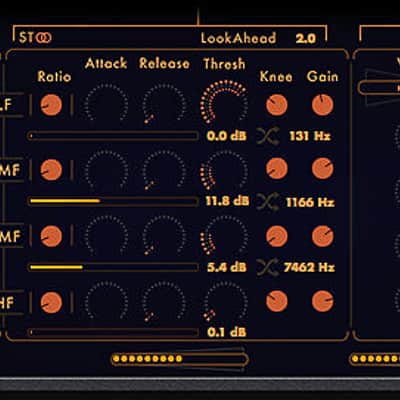
From subtle to slam, adjust lookahead, compression frequency bands, threshold, attack, release, knee and gain for each of the 4-bands. With full RMS metering for each frequency band.
Stereo
With full control over 4 haas bands and width, adjust the stereo field of the audio. Widen the elements of a mix or enhance old stereo recordings, with just a few simple controls.
Limiter
Powerful compression and peak limiting processor with full attack, release, knee, threshold parameters and metering. Capable of transparently ‘shaving off ’ a few dB to decimated a mixdown - for maximum impact - while still maintaining clarity.
Hi-Pass Filter
Hi-pass filtering for removing clutter from the stereo mix or sides from 0Hz to 1.2kHz.
Compatibility
Windows
Installation Instructions
What it is:
Cutting-edge multi-effect from Sample Magic.
How we use it:
Dial-in high-quality distortion, multi-band compression, 4-band EQ, brick-wall limiting, and more.
Why it's cool:
With every module possessing a mid/side processing option, low-latency mode, RMS metering, and CPU-optimized performance, Boost Pro is a true sonic multi-tool. Utilizing cutting-edge low-latency DSP, Boost Pro provides distortion, multi-band compression, 4-band equalization, stereo enhancement, brick wall limiter and hi-pass filter all in one easy-to-use plugin for a variety of audio applications.
Boost Pro is an all-in-one audio finalizing utility with six independent effects each utilizing advanced, automatable, parameter control. Every effect module has a mid/side processing option, comprehensive RMS metering, dedicated low-latency mode, CPU-optimized performance and text-editable fields. From simple mixdown lift to full mastering solution, vocal chain or live instrument processor - the list of applications are endless. Easily bypass effect sections, browse 100 multi-genre presets and re-order compression/EQ for extra sonic character.
With full control over mid/side parameters, every module within Boost Pro can be applied to the stereo signal, middle or sides at the simple click of a button. The individual level of each effect can be easily adjusted using the elegant macro knobs, for quick on-the-fly tweaks, or parallel processed using the advanced controls for classically styled compression models and limiting. Stylish VU meters give visual control over all processes.
With its enhanced low latency settings mode, Boost is suitable for tracking or can be placed on the mix buss from the outset, making tracks quickly and easily comparable with commercially finished masters. With a plain, easy to use interface, controls are laid out elegantly yet simply, with a ‘Boost’ setting for re-ordering components to give greater gain and bass output.
Not just for the mix buss, place it on a muddy drum track for meaty width and energetic flare, give vocals a multi dimensional stereo edge, remaster old productions, fix live performances, DJ mixes and voiceovers. Get foley broadcast ready, redefine midrange and make cumbersome, CPU-intensive processing a figment of the past.
Enter values at the click of a mouse, keyboard, automate or simply tweak. Enjoy complete control over six independent processes.
Dirt
From mix warmth, techno kicks to full-on guitar grit, Boost Pro’s ‘Dirt’ processor gives access to a variety of applications. Be warned!
4-Band EQ
With adjustable frequency bands for low, mid, high-mid and high frequencies, Boost Pro’s comprehensive EQ allows individual Q and gain settings for each band.
Multiband Compression
From subtle to slam, adjust lookahead, compression frequency bands, threshold, attack, release, knee and gain for each of the 4-bands. With full RMS metering for each frequency band.
Stereo
With full control over 4 haas bands and width, adjust the stereo field of the audio. Widen the elements of a mix or enhance old stereo recordings, with just a few simple controls.
Limiter
Powerful compression and peak limiting processor with full attack, release, knee, threshold parameters and metering. Capable of transparently ‘shaving off ’ a few dB to decimated a mixdown - for maximum impact - while still maintaining clarity.
Hi-Pass Filter
Hi-pass filtering for removing clutter from the stereo mix or sides from 0Hz to 1.2kHz.
Compatibility
Windows
- Windows Vista or higher (tested up to Windows 10)
- SSE2-enabled processor (Pentium 4 or later)
- Minimum 2GB RAM
- Any VST / Audio Unit (32/64-bit)
- Mac OS X 10.7 or higher (tested up to 10.12 Sierra)
- Intel processor Mac
- Minimum 2GB RAM
- Any VST / Audio Unit (32/64-bit)
Installation Instructions
- Create a Sample Magic account.
- Visit the Boost Pro product page here.
- Add Boost Pro to your cart.
- Go to your cart.
- Under 'enter discount code,' enter the code emailed to you via Reverb.
- Click 'apply discount' to register your product.
- You can then download Boost Pro under 'My Plugins' here.
- Double-click on the file ‘Boost Pro MAC install.dmg’. This unpacks the zip into the installer file.
- Double-click on the file ‘Sample Magic - Boost Pro.pkg’. This starts the installer which will guide you through the process. Click ‘Continue’ to start the install then select the destination drive.
- The standard install will install all plugin formats. To customise the install, select the formats you wish to install and click ‘Continue’.
- The software is now installed. Click ‘Close’ to finish.
- System Preferences > Security & Privacy (General) and ensure the radio button
- ‘Allow apps downloaded from: Mac App Store and identified developers’ is highlighted. If on Mac OS 10.12 and above you may see a warning saying the installer cannot be installed and may require giving permission to the Boost Pro installer.
- If this happens go to System Preferences > Security & Privacy (General) and you will see ‘Sample Magic - Boost Pro.pkg’ was blocked from opening because it is not from an identified developer’. Click the button ‘Open Anyway’ and the installer will begin.
- Double-click the Zip file to unpack. Double-click the.exe file to launch the installer.
- The setup wizard will guide you through installation. Click 'next’ to continue.
- The plugins and library will now be installed.
- Click ‘Finish’ to close the setup window.
| Marque | |
|---|---|
| Modèle |
|
| Catégories |
Des informations concernant la sécurité des produits peuvent être disponibles ici.