AudioThing Speaker
Prezzo$19
Download istantaneo
Questo annuncio è terminato.
Vedi strumenti simili di altri venditori Reverb
Pubblicato:più di un mese fa
Visualizzazioni:9.582
Salvataggi:63
Offerte:20

Chicago, IL, Stati Uniti
I nostri utenti valutano Reverb
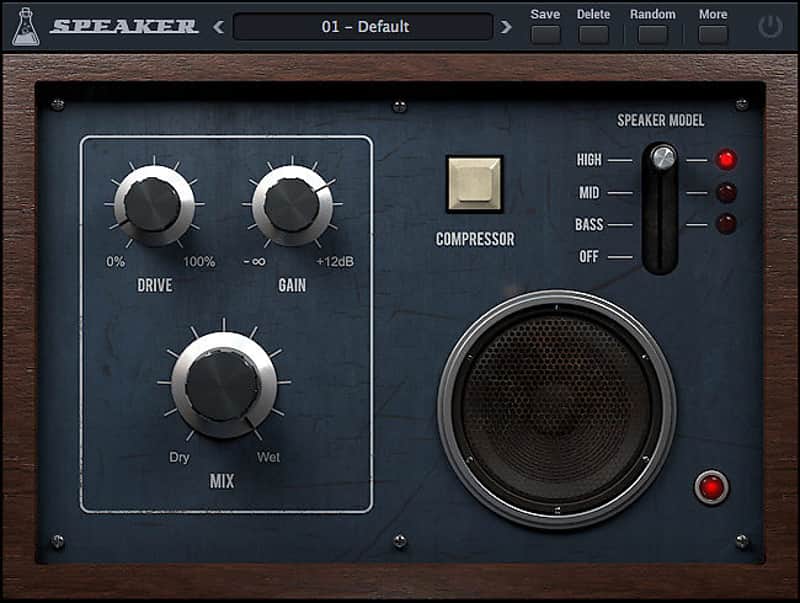
Overdrive With Speaker Emulation - Marry the crystal clear sound of a digital recording with that of a strung-out, distorted speaker.
What it is:
An overdrive with speaker emulation.
How we use it:
Manipulate any audio source as if it were being recorded from an old radio.
Why it’s cool:
Speaker is as simple as it sounds, yet, produces some beautifully complex effects.Speaker is a simple overdrive effect with speaker emulation. It also features a fixed compressor, gain stage and mix knob. Speaker can be used to make any audio source sound as if it’s being played on an old radio. It can also be used to emulate a cheap guitar cabinet or to give harshness to any sound.
Specifications:
Reviews:
Speaker delivers an excellent overdrive and/or speaker simulation effect that is perfect for giving guitars a cheap catalogue cabinet crunch and vocals an old time “radio effect”.
4.5/5 – Gearslutz review
AudioThing’s cheery little gadget gets everything right, and is one you’ll find yourself reaching for time and time again as both a quick fix for overly clean instrumentation and an overt special effect.
9/10 – Computer Music Magazine review on Music Radar
Compatibility
Minimal Requirements:
Installation Instructions
Instructions:
- Register your account here: https://www.audiothing.net/account/signup/
- Confirm your email address and log in here: https://www.audiothing.net/account/
- Click on the "Redeem code" page to get the installers and license
How to use installed plugins in Ableton Live: https://www.youtube.com/watch?v=N2VjFjUhlR4
What it is:
An overdrive with speaker emulation.
How we use it:
Manipulate any audio source as if it were being recorded from an old radio.
Why it’s cool:
Speaker is as simple as it sounds, yet, produces some beautifully complex effects.Speaker is a simple overdrive effect with speaker emulation. It also features a fixed compressor, gain stage and mix knob. Speaker can be used to make any audio source sound as if it’s being played on an old radio. It can also be used to emulate a cheap guitar cabinet or to give harshness to any sound.
Specifications:
- 3 Speaker emulations: bass, mid, high
- Overdrive with Gain stage
- Fixed Compressor
- Preset system with randomizer
- Formats: VST, AU, and AAX (32/64bit)
- Platforms: OSX, Windows
Reviews:
Speaker delivers an excellent overdrive and/or speaker simulation effect that is perfect for giving guitars a cheap catalogue cabinet crunch and vocals an old time “radio effect”.
4.5/5 – Gearslutz review
AudioThing’s cheery little gadget gets everything right, and is one you’ll find yourself reaching for time and time again as both a quick fix for overly clean instrumentation and an overt special effect.
9/10 – Computer Music Magazine review on Music Radar
Compatibility
Minimal Requirements:
- Windows: XP SP2 / OSX 10.7
- Mac: Intel Core 2 Duo 2GHz or equivalent
- 2 GB RAM / 500 MB HD
- Screen resolution: 1024×768
- VST2, AU, or AAX 32-bit or 64-bit host
Installation Instructions
Instructions:
- Register your account here: https://www.audiothing.net/account/signup/
- Confirm your email address and log in here: https://www.audiothing.net/account/
- Click on the "Redeem code" page to get the installers and license
How to use installed plugins in Ableton Live: https://www.youtube.com/watch?v=N2VjFjUhlR4
- If Ableton Live is closed, open it and skip to #5.
- If Ableton Live is already open, go to Preferences.
- Go to Files & Folder.
- Click "Rescan plugins".
- Find the plugin in the Ableton plugins folder in the sidebar.
- Drag-and-drop the plugin onto your track at the bottom of the screen.
- Open Logic Pro X. Newly installed plugins should be detected automatically every time Logic is opened.
- If you've downloaded an effect or utility plugin, these can be used on an insert for any track in the mixer.
- Create a software instrument track if you downloaded a virtual instrument plugin.
- Under Default Patch, go to AU Instruments and choose the plugin you just installed.
- Open Pro Tools. Newly installed plugins should be detected automatically every time Pro Tools is opened.
- If you've downloaded an effect or utility plugin, these can be used on an insert for many types of tracks (Audio, Aux, Instrument, Master Fader...)
- If you’ve downloaded a software instrument, create a new Instrument track.
- Navigate to the Mixer and locate the newly created Instrument track.
- Select the desired instrument plugin by clicking on any of the Inserts on the Instrument track.
- Go to the Reverb SYNC Software and plugin Collection.
- Choose your desired plugin.
- Reverb will auto-detect your platform, so simply click the download button.
- Continue the installation process by following the prompt.
- Hover your mouse over the smart control button.
- Click Show Inspector icon.
- Click on plugins and choose your desired plugin.
- To register your plug-in, you should have a valid license file (*.atl).
- Go to https://www.audiothing.net/account/signup/ to register your license.
- Inside the plug-in window, click on the More button and then choose Registration.
- A popup window will open, click on “Load License File…” and locate your license file.
| Marchio | |
|---|---|
| Modello |
|
| Categorie |
Le informazioni sulla sicurezza del prodotto sono disponibili qui.