![Overtone Labs tune-bot studio [Drum Tuner] image 1](https://rvb-img.reverb.com/i/s--T28K5XS---/quality=medium-low,height=800,width=800,fit=contain/pivauicgkgvosayjcqwe.jpg)
![Overtone Labs tune-bot studio [Drum Tuner] image 1](https://rvb-img.reverb.com/i/s--KN2LAvkm--/quality=medium-low,height=400,width=400,fit=cover,gravity=bottom/pivauicgkgvosayjcqwe.jpg)
![Overtone Labs tune-bot studio [Drum Tuner] image 2](https://rvb-img.reverb.com/i/s--kIpeTFc3--/quality=medium-low,height=400,width=400,fit=cover,gravity=bottom/jlfg2zcanamdouytbyd7.jpg)
![Overtone Labs tune-bot studio [Drum Tuner] image 3](https://rvb-img.reverb.com/i/s--eCbYTygq--/quality=medium-low,height=400,width=400,fit=cover,gravity=bottom/bmbc0fliphtceuxgfkra.jpg)
![Overtone Labs tune-bot studio [Drum Tuner] image 4](https://rvb-img.reverb.com/i/s--ulNDHsVm--/quality=medium-low,height=400,width=400,fit=cover,gravity=bottom/kqv8xedq1ourrgel347u.jpg)
![Overtone Labs tune-bot studio [Drum Tuner] image 5](https://rvb-img.reverb.com/i/s--DFRXfPXY--/quality=medium-low,height=400,width=400,fit=cover,gravity=bottom/kgix2oc8cvfquhhpvfzw.jpg)
![Overtone Labs tune-bot studio [Drum Tuner] image 6](https://rvb-img.reverb.com/i/s--PqmELu5f--/quality=medium-low,height=400,width=400,fit=cover,gravity=bottom/u9w0v9zqgh85pk67mvpz.jpg)
![Overtone Labs tune-bot studio [Drum Tuner] image 7](https://rvb-img.reverb.com/i/s--r8a2fReJ--/quality=medium-low,height=400,width=400,fit=cover,gravity=bottom/plzo02j9popgixo8ipey.jpg)
![Overtone Labs tune-bot studio [Drum Tuner] image 8](https://rvb-img.reverb.com/i/s--jA5kPqp9--/quality=medium-low,height=400,width=400,fit=cover,gravity=bottom/sbhjtxz6bbl2n2uelmi4.jpg)
![Overtone Labs tune-bot studio [Drum Tuner] image 9](https://rvb-img.reverb.com/i/s--XESt5sZv--/quality=medium-low,height=400,width=400,fit=cover,gravity=bottom/kcwaxdp6kejtnbqpv380.jpg)
![Overtone Labs tune-bot studio [Drum Tuner] image 10](https://img.youtube.com/vi/A0eKpJG8Umk/hqdefault.jpg)
Overtone Labs tune-bot studio [Drum Tuner]
Price€119.21
Incl. VAT
+ €53.13 Shipping
Listed:over a month ago
Views:376
Saves:5
Offers:0

Tokyo, Japan
Our users rate Reverb
Our Business Hours is Mon to Fri / 11:00 to 18:00 JPN time
We will close Sat and Sun, so we will reply to inquiry that received weekend on next week.
Your understanding will be appreciated.
We are receiving the customer order with first comes first serves basis both on website and at real shop.
So occasionally it will be sold out while having email communication.
Please understand in advance.
Japanese consumption tax is not required for international shopping. However you may be required to pay duty, tax and import fee when receiving your items in your country. You must pay all these duty, tax and fee as receiver/importer and we do not cover any of them.
■Please note
The product description is an automatic translation of the Japanese description. Please contact us if you have any questions.
-----------------------------------
[tune-bot studio]
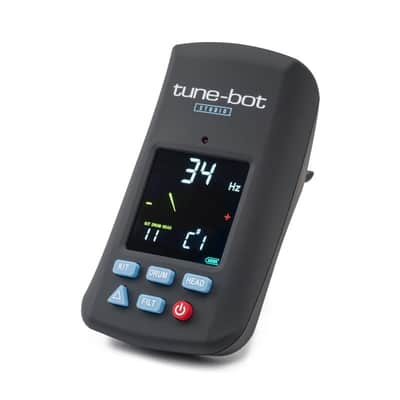
Until now, drum tuning has been done by ear and feel. With the "tune-bot," you can check the pitch in Hz and see the interval, giving you the advantage and peace of mind of being able to "see" it visually. This revolutionary product can be used not only for drums, but also for a variety of percussion instruments such as timpanis.
- Tuning is possible by scale and pitch (Hz).
- This tuner's filter mode function makes it easy to tune percussion instruments.
- The memory function allows you to recall and compare recorded tunings.
- The clip securely fastens to the hoop.
Set on the hoop part of the instrument (both die-cast hoops and pressed hoops can be installed)
Reproduce your own sound anytime, anywhere.
- Can be displayed in either Hertz or musical scale.
- You can tune timpani, drum sets, Latin percussion instruments, etc. by scale.
-Difference mode allows you to save and reproduce your favorite sounds.
- Filter mode prevents unwanted harmonics from being picked up.
-You can save the sounds of 10 drums.
-Easy-to-read color display.
- Comes with a hard case.
・POWER (red circle button) - Power ON/OFF
・KIT/DRUM/HEAD - Tuning is saved and recalled in the order KIT→DRUM→HEAD.
・△ - Switch between difference mode and absolute mode.
・FILT - Filter mode ON/OFF
・Difference mode - Displays the error between the reference value and the measured value.
・Absolute mode - Displays the current measurement value.
・Filter mode - Cuts out unnecessary sounds.
When an orchestra or band doesn't sound cohesive, or you feel like something is off, adjusting the drums to a certain pitch can often solve the problem. Try measuring and matching the pitch.
■For those tuning drums for the first time■
~To make head tuning easier~
Mute the head you are not tuning. Tuning only one head will make tuning easier and reduce noise.
*Items that can be used as mutes: carpets, sofas, pillows, round drum stools, etc.
~When installing a new head and tuning~
(When installing a new head, it will loosen after tuning, so it is important to make sure the head is stable.)
1. Before attaching the head, clean the edge (the part of the shell where the head will touch) and attach the head and hoop.
2. Next, tighten the bolts with your fingers, always tightening the bolts facing each other in order until they can no longer be turned with your fingers.
3. When you can no longer turn the bolts with your fingers, use the tuning key to tighten the bolts little by little diagonally, being careful not to tilt the head.
4. Once the wrinkles on the head have disappeared and the sound is resonant, tune it using the Tune-bot.
*New heads will be tuned multiple times until they are stable.
*To stabilize the head quickly, it is common to tune the head higher and apply weight as if extending the head.
~When tuning an existing head~
(When tuning a head you are using, loosen the head below the desired pitch.)
1. Tune the guitar by tapping the edges of the head in order, starting with the bolts closest to the highest note, then loosening the other bolts and gradually tightening them to tune the guitar. This is easier than tuning from high to low.
*When tuning, gradually tighten the bolts diagonally opposite each other. Tightening the diagonally opposite bolts allows you to tune the guitar more quickly than tightening any of the other bolts.
2. To measure the overall pitch of the drum, strike the center of the drum. Remove any mutes and place the drum in the air (for example, by placing it on a stand). This will allow you to measure the overall pitch.
~To understand tuning further~
When tuning, tuning the top and bottom heads to the same pitch will produce a better resonance. Tuning the top and bottom heads to different pitches will emphasize the attack and reduce the sustain of the sound. Find out for yourself what kind of sound you like.
Range: 30-400Hz, 1C-4G#
High range mode: 30-450Hz, 1C-4A
Sine wave analysis: +/-0.5Hz
Response time: 750mSec
Weight: 72g (batteries not included)
Accessories: Dedicated case, 2 AAA batteries
*Notes*
・The values measured by this tuner are only a reference value.
- The pitch of the drum changes depending on where you hit it, so please check the instruction manual before tuning. (The closer you hit the hoop, the higher the pitch.)
・It is not waterproof.
We will close Sat and Sun, so we will reply to inquiry that received weekend on next week.
Your understanding will be appreciated.
We are receiving the customer order with first comes first serves basis both on website and at real shop.
So occasionally it will be sold out while having email communication.
Please understand in advance.
Japanese consumption tax is not required for international shopping. However you may be required to pay duty, tax and import fee when receiving your items in your country. You must pay all these duty, tax and fee as receiver/importer and we do not cover any of them.
■Please note
The product description is an automatic translation of the Japanese description. Please contact us if you have any questions.
-----------------------------------
[tune-bot studio]
Until now, drum tuning has been done by ear and feel. With the "tune-bot," you can check the pitch in Hz and see the interval, giving you the advantage and peace of mind of being able to "see" it visually. This revolutionary product can be used not only for drums, but also for a variety of percussion instruments such as timpanis.
- Tuning is possible by scale and pitch (Hz).
- This tuner's filter mode function makes it easy to tune percussion instruments.
- The memory function allows you to recall and compare recorded tunings.
- The clip securely fastens to the hoop.
Set on the hoop part of the instrument (both die-cast hoops and pressed hoops can be installed)
Reproduce your own sound anytime, anywhere.
- Can be displayed in either Hertz or musical scale.
- You can tune timpani, drum sets, Latin percussion instruments, etc. by scale.
-Difference mode allows you to save and reproduce your favorite sounds.
- Filter mode prevents unwanted harmonics from being picked up.
-You can save the sounds of 10 drums.
-Easy-to-read color display.
- Comes with a hard case.
・POWER (red circle button) - Power ON/OFF
・KIT/DRUM/HEAD - Tuning is saved and recalled in the order KIT→DRUM→HEAD.
・△ - Switch between difference mode and absolute mode.
・FILT - Filter mode ON/OFF
・Difference mode - Displays the error between the reference value and the measured value.
・Absolute mode - Displays the current measurement value.
・Filter mode - Cuts out unnecessary sounds.
When an orchestra or band doesn't sound cohesive, or you feel like something is off, adjusting the drums to a certain pitch can often solve the problem. Try measuring and matching the pitch.
■For those tuning drums for the first time■
~To make head tuning easier~
Mute the head you are not tuning. Tuning only one head will make tuning easier and reduce noise.
*Items that can be used as mutes: carpets, sofas, pillows, round drum stools, etc.
~When installing a new head and tuning~
(When installing a new head, it will loosen after tuning, so it is important to make sure the head is stable.)
1. Before attaching the head, clean the edge (the part of the shell where the head will touch) and attach the head and hoop.
2. Next, tighten the bolts with your fingers, always tightening the bolts facing each other in order until they can no longer be turned with your fingers.
3. When you can no longer turn the bolts with your fingers, use the tuning key to tighten the bolts little by little diagonally, being careful not to tilt the head.
4. Once the wrinkles on the head have disappeared and the sound is resonant, tune it using the Tune-bot.
*New heads will be tuned multiple times until they are stable.
*To stabilize the head quickly, it is common to tune the head higher and apply weight as if extending the head.
~When tuning an existing head~
(When tuning a head you are using, loosen the head below the desired pitch.)
1. Tune the guitar by tapping the edges of the head in order, starting with the bolts closest to the highest note, then loosening the other bolts and gradually tightening them to tune the guitar. This is easier than tuning from high to low.
*When tuning, gradually tighten the bolts diagonally opposite each other. Tightening the diagonally opposite bolts allows you to tune the guitar more quickly than tightening any of the other bolts.
2. To measure the overall pitch of the drum, strike the center of the drum. Remove any mutes and place the drum in the air (for example, by placing it on a stand). This will allow you to measure the overall pitch.
~To understand tuning further~
When tuning, tuning the top and bottom heads to the same pitch will produce a better resonance. Tuning the top and bottom heads to different pitches will emphasize the attack and reduce the sustain of the sound. Find out for yourself what kind of sound you like.
Range: 30-400Hz, 1C-4G#
High range mode: 30-450Hz, 1C-4A
Sine wave analysis: +/-0.5Hz
Response time: 750mSec
Weight: 72g (batteries not included)
Accessories: Dedicated case, 2 AAA batteries
*Notes*
・The values measured by this tuner are only a reference value.
- The pitch of the drum changes depending on where you hit it, so please check the instruction manual before tuning. (The closer you hit the hoop, the higher the pitch.)
・It is not waterproof.
| Condition | Brand New (New) Brand New items are sold by an authorized dealer or original builder and include all original packaging.Learn more |
|---|---|
| Brand | |
| Model |
|
| Categories |
Product safety information may be available here.

