


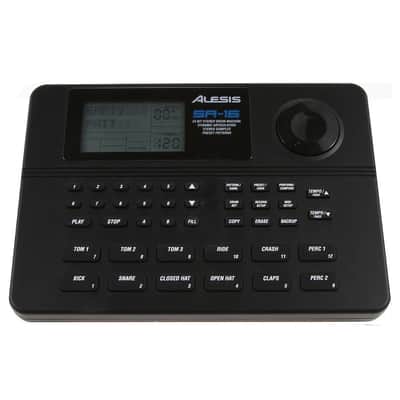
(USED) Alesis SR-16 Drum Machine
Il venditore non ha impostato il costo di spedizione per Canada. Per favore contatta e chiedigli il costo della spedizione.


This pre-owned Alesis SR-16 is the drum machine that’s been a staple of home studios and stage rigs since 1990, and it still does the job the same simple way: pick a kit, tap in a pattern, and you’ve got a full drum arrangement in seconds. It holds 233 realistic drum and percussion sounds across 50 factory kits, with 12 velocity-sensitive pads that respond to how hard you hit them.
It’s a smart pick for songwriters who want a hands-on rhythm partner instead of another plug-in window, and for performers who need a reliable backing track machine that doesn’t depend on a laptop. Because the SR-16’s controls are straightforward physical buttons, there’s very little to go wrong, which is part of why so many of these units are still working decades after they left the factory.
Key Features Dynamic Articulation PadsThe 12 velocity-sensitive pads change the tone of each drum sound as you hit harder or softer, so played-in parts sound less like a machine and more like a drummer.
233 Realistic Drum SoundsA deep library of natural-sounding kicks, snares, hats, and percussion gives you enough variety to cover most styles without digging through menus.
Studio-Played PresetsAll 50 factory patterns were actually played in by session drummers rather than quantized, so they groove more naturally straight out of the box.
50 User Pattern SlotsBuild and save your own beats alongside the presets, each with A and B sections plus two fill variations for arranging full songs.
Full MIDI I/OMIDI In, Out, and Thru let the SR-16 sync with a DAW or trigger from an external sequencer, so it slots into an existing setup easily.
Footswitch ControlA footswitch jack handles start/stop and A/B/fill switching hands-free, which is useful for solo performers who need both hands on an instrument.
How to Play Your First Beat- Connect the 12V power supply and power on the SR-16, then press the Kit button to choose one of the 50 preset drum kits.
- Press Pattern and dial in a preset pattern number from 1–50 using the data wheel or number pads.
- Press Play/Pause to start the groove, then tap A, B, or Fill at any point to switch between arrangement variations on the fly.
- Press Stop when you’re finished, or plug in a footswitch to control start/stop and fills hands-free during a performance.
Care Tip: The SR-16 doesn’t back up custom patterns to a computer, so before you start editing kits or patterns on this pre-owned unit, jot down or photograph any factory settings you want to keep — a reset will erase anything programmed over them.
| Pubblicato | un giorno fa |
|---|---|
| Condizione | Molto buono (Usato) Gli articoli "Molto buoni" possono mostrare qualche piccolo segno o graffio ma sono pienamente funzionali e in buone condizioni generali.Scopri di più |
| Marchio | |
| Modello |
|
| Categorie | |
| Prodotto in |
|
| Numero di pad |
|
| Polifonia |
|
| MIDI I/O |
|
| Analogico / digitale |
|
Le informazioni sulla sicurezza del prodotto sono disponibili qui.

Protezione di Reverb
Resi semplici, transazioni sicure, assistenza di persone in carne e ossa
Scopri di più