


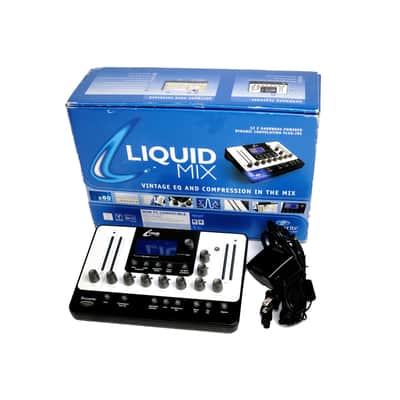
Focusrite Liquid Mix 32 2010s - Black/White
Il venditore non ha impostato il costo di spedizione per Canada. Per favore contatta e chiedigli il costo della spedizione.

I bought this unit and, due to my own ignorance, spent a couple of days with it before giving up; then I bought a Focusrite Liquid Channel and used that extensively on another computer system. A couple of weeks ago, with more time on my hands, I decided to figure out what was going on with the LM, being helped by Google AI; the latter suggested the following:
1. Fix the Liquid Mix Minimum Latency Conflict
The Focusrite Liquid Mix has a strict hardware rule: Liquid Mix Latency = (2 × DAW Buffer Size) + 8 samples.
- At a 128-sample buffer, the math equals 264 samples
- Open your Liquid Mix Manager application (outside of Logic).
- Check the Minimum Latency setting. If it is set to the default 520 samples, Logic 9 will miscalculate the return path buffer and drop the input signal stream completely.
- The Fix: Change the Liquid Mix Manager's Minimum Latency to exactly 264 samples (or 256 depending on your firmware version) to match Logic's 128-sample buffer layout. Alternatively, change Logic's buffer to 256 samples and change the Liquid Mix Manager to 520 samples.
2. Adjust Logic's "Process Buffer Range"
GarageBand uses a static, large processing engine, whereas Logic 9 uses a dynamic, multi-tier engine.
- Go to Logic Pro > Preferences > Audio > Devices.
- Locate Process Buffer Range.
- If it is set to Small, change it to Medium or Large. Liquid Mix plugins require large data chunks over the PCIe-to-FireWire bus to instantiate their DSP profiles. A Small setting causes the audio stream to miss the physical window of the hardware.
3. Change the Plug-In Delay Compensation (PDC)
Logic 9 handles latency calculation per-track, which can break the audio feed to external DSP hardware if misconfigured.
- Go to Logic Pro > Preferences > Audio > General.
- Look for Plug-in Delay Compensation.
- Switch the mode from Audio Tracks to All. This forces Logic to properly calculate the heavy round-trip latency of the Liquid Mix hardware on both audio tracks and aux/bus auxiliary paths.
4. Turn Off "Universal Track Mode" Mismatches
Because the issue happens on both mono and stereo instances, Logic's internal channel-interleaving could be breaking the wrapper routing.
- Go to Logic Pro > Preferences > Audio > Devices.
- Uncheck Universal Track Mode, click Apply, and then re-check it. This resets Logic's internal routing engine and forces the 32-bit audio unit bridge to correctly map mono/stereo streams to the external hardware inputs.
5. Disable "Input Monitoring Only for Focus Track"
GarageBand monitors audio automatically, but Logic 9 restricts input signals depending on track selection. [1]
- Go to Logic Pro > Preferences > Audio > General.
- Deselect the checkbox for "Input monitoring only for focus track, and only when input monitoring is enabled". This prevents Logic from cutting off the processing stream to the hardware when you click off the track.
If adjusting the Liquid Mix Manager's minimum latency doesn't immediately restore the meters on the hardware, test Logic 9 at 512 samples just to see if the hardware handshake engages. If it works at 512 but not at 128, your PCIe card may need its Mac OS driver fallback changed to the "Legacy" FireWire profile.
------------------------------------------------------------
The suggestions were a tremendous help - I was able to get things basically working using Logic 9.1.8 (32 bit) on a 8-Core Mac running 10.6.8 with a 32-bit wrapper. I understand that people also use LM with Logic 10 with an appropriate wrapper and Firewire adapters daisy-chained, but I have not tried that. I was able to load 32 tracks and play that back but I will admit that this was not smooth, maybe not due to the LM itself, but because that particular 8-core system is ancient. So, the LM itself is barely touched (even has the factory protective screen film still on it), and would be suitable for someone that is well-versed in getting such devices to 'play the game'.
Questo articolo è venduto "Come da descrizione”
Questo articolo è venduto "Come da descrizione" e non può essere restituito a meno che non arrivi in condizioni diverse da come è stato descritto o fotografato. Gli articoli devono essere restituiti nelle condizioni originali in cui sono stati spediti, con tutti gli imballi originali.Scopri di più.
| Pubblicato | 22 giorni fa |
|---|---|
| Condizione | Eccellente (Usato) Gli articoli "Eccellenti" sono quasi completamente privi di difetti e altri difetti visivi e sono stati suonati o utilizzati con la massima cura.Scopri di più |
| Marchio | |
| Modello |
|
| Finish |
|
| Categorie | |
| Anno |
|
Le informazioni sulla sicurezza del prodotto sono disponibili qui.


Protezione di Reverb
Resi semplici, transazioni sicure, assistenza di persone in carne e ossa
Scopri di più