Nektar Panorama CS12 Channel Strip Controller For Logic Pro
This seller has not set a shipping cost for Australia. Please contact them to ask about shipping.
Original PriceA$698.92
14% price drop
New PriceA$605.98
+ Shipping
Listed:over a month ago
Views:528
Saves:4

London, United Kingdom

14-Day Return Policy
Enjoy peace of mind with your new gear
Our users rate Reverb
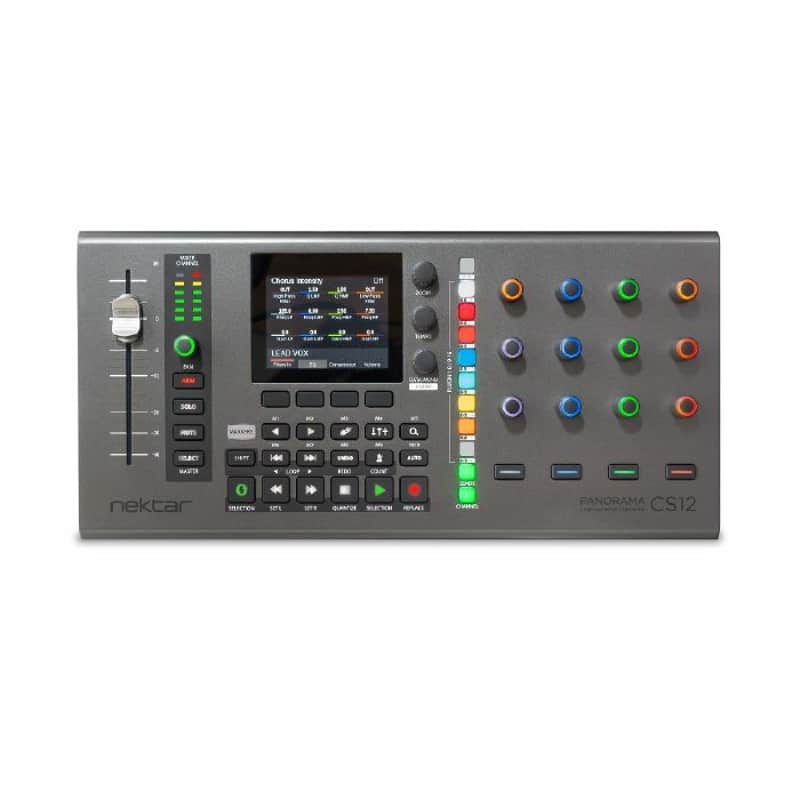
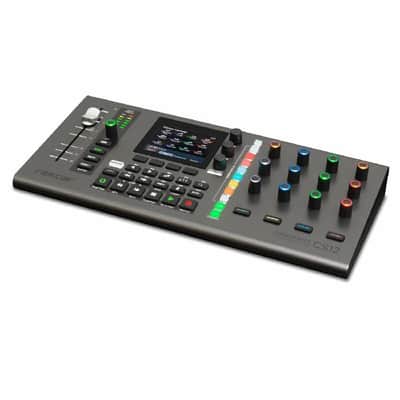
Logic Pro users, pay close attention. Full channel strip control via one of the most ergonomic, effectively designed options around. Take charge via a 100mm motorised fader, dedicated pan knob and 12 assignable pots.
Supplier's Notes:
The Best Channel Strip Controller for Logic Pro
Panorama CS12 does what no other controller can do: Give full control of all Logic Pro channel strip parameters including plugins. There is nothing vanilla about Panorama CS12. The entire workflow is designed from the ground up, which enables astonishing features, with a workflow never seen on a control surface before.
High Resolution Fader with a Touch of Class!
A 100mm ALPS motorized fader follows the selected mixer channel when you work. With up to 14 bit resolution, you get detailed control with touch sensing enabling automation override and update captures in real time.
Paired with a dedicated pan control, as well as buttons for solo, mute and record arm, you have instant access to all main mixer parameters on the selected channel.
Create Clean Automation, Easy and Fast
Recording automation can get messy with lots of data generated even when a simple fader is needed. Panorama CS12 solves the problem by giving you the option to insert automation points.
Touch the fader, set the value with the fader, and done!
Jump to the next position in the timeline and insert another automation point. Clean, easy and fast.
Complete Insert FX Plugin Control
Panorama CS12 excels at controlling plugins. You can control any plugin without looking at the plugins' UI so you can focus on creating, composing and editing.
Many commonly used plugins are pre-mapped including of course Logic Pro's own. Panorama CS12 dedicates 12 RGB illuminated 360 pots, 4 display buttons and an additional 4 RGB LED buttons to plugin control. Every control can be assigned on multiple pages ensuring as a complete plugin experience, with no parameter left behind.
Via the ControlCore mapping system, it stores all settings in unique files so they can be ported to other computer systems and ensure compatibility with other DAWs in the future.
Any Plugin? ....Really?
Any plugin that presents its parameters for automation in Logic Pro, can be controlled from Panorama CS12. That includes Logic Pro's own plugins and any AU plugin hosted in Logic Pro.
There is no wrapper or plugin host. It just works.
Plugin Slot Selection
CS12 control insert plugins like no controller has ever done before. The 8 plugin slot select buttons are illuminated when plugins are present in the first 8 slots and the top button toggles between slots 1-8/9-16. Press a button and control the insert plugin immediately. Press another button and now control that plugin.
Control Any Parameter NOW
Control any parameter by simply clicking on it. The 100mm ALPS fader immediately jumps to the clicked parameters position and you take over from there. The fader or pan rotary, can be used to control any parameter in the currently selected Logic Pro channel, at any time.
Activate the Select button and the motorized fader now controls any parameter you click. Any mixer channel, instrument or insert effect plugin parameters. Click, control, click control. Super easy.
Plugin Parameter Learn
A plugin quick learn feature enables assignments on the fly. It's as simple as moving a parameter and moving a control to complete assignment. And while you are at it, change the LED colour of the control too.
Nektarine Map Creation
For the ultimate in control mapping, use the included Nektarine application/plugin. Assign parameters to controls using drag and drop, create your page structure and name parameters and pages so they are optimized for CS12. Once saved, plugin maps are picked up by ControlCore for use with CS12.
Precision control at 10x resolution
14 bit control resolution is not limited to the motorized fader. With the Fine button (magnifier icon) enabled each of the 12 pots control at 14 bit resolution. In practice this means you'll be able adjust parameters with the same fine grained values available through your plugins UI or up to 10 x regular control resolution.
Features & specifications
Panorama CS12
1 100mm ALPS motorized fader.
4 RGB LED control buttons.
6 segment LED meter.
3.5" TFT colour display.
4 display buttons.
4 channel strip LED buttons.
18 Function and navigation LED buttons
2 encoders for zoom and tempo.
1 encoder with push button for Data/Menu
13 endless or 360 potentiometers with RGB LED illumination.
11 RGB LED buttons for selection of channel strip sections.
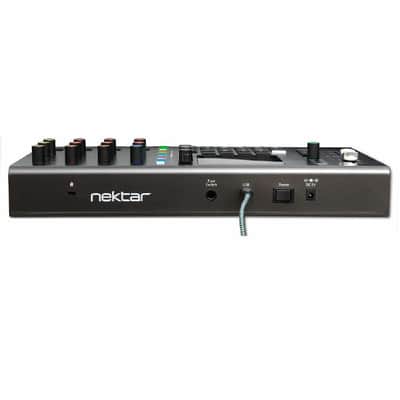
1/4" TRS Footswitch socket for basic handsfree DAW control.
Connect up to two foot switches using TRS to TS Y-cable splitter.
System requirements
USB class compliant, no driver needed.
Nektar ControlCore installation required. Unit doesn't operate on its own.
A Nektar account for registration and download of support files.
USB Power Requirement: 500 mA minimum, connect to a USB high power port recommended.
MacOS: 11.5 or later.
Logic Pro: 10.7.8 or higher.
Dimensions & weight
39 cm (L) x 11,5 cm (D) x 3,2 cm (H), 0,49 kgs
In the box
Panorama CS12
Quickstart guide and functional overview. All other documentation is part of the download package.
USB A to C cable.
*UPDATE 27/04/2026*
Nektar announces the immediate release of Panorama CS12 ControlCore 1.2 with integration for Reaper and Fender Studio Pro/Studio One, bringing the total number of supported DAWs to four. Joining the existing integrations for Apple Logic Pro and Steinberg's Cubase & Nuendo, both new DAWs benefit from the same extensive Panorama CS12 workflow including full insert plugin FX and channel strip control, DAW navigation, high resolution detail parameter control and now, instrument plugin support across all four platforms.
Panorama CS12 now delivers instrument plugin control in every supported DAW. Mapping is included out of the box for each DAW's own instruments as well as a wide range of popular third-party plugins. Users who want to go further can build their own instrument mapping directly - either by learning parameters to controls from Panorama CS12 itself, or by using Nektar's Nektarine plugin application to create complete page structures, rename parameters, and fine- tune assignments. A new option to use the Tempo encoder for plugin preset selection is also included. This works both with instrument and effects plugins, if presets are available in the DAW's browser.
Panorama CS12 unlocks deep integration with Fender Studio Pro's unique features. The Channel button provides instant access to Studio Pro's macros with knob 1-8 and button 1-4 macros fully assigned and controllable from the hardware. Fender Studio Pro (as well as Studio One 6 and 7) have extensive custom color options which Panorama CS12 takes advantage of, including the individual color-coding of macros.
Reaper users gain direct send management from the Panorama CS12 hardware. New sends can be added on the fly, complete with track destination selection. A dedicated detail page provides full control of the selected send - including pan, pre/post routing, phase, mono/stereo, and mute. The "Receive from Track" page completes the experience by assigning controls to send levels routed into the currently selected track.
Nektar's ControlCore management system (now at version 1.2) is at the heart of what makes Panorama CS12 uniquely powerful: the same instrument and insert FX plugin mapping works seamlessly across all four DAWs. While functionality and communication are handled by the DAW's native control surface API, ControlCore makes it all work behind the scenes, delivering a
common plugin map approach, free from wrappers and plugin hosts. Plugin mappings are stored as individual files and therefore fully portable across computer systems, protecting the time invested in building a personalized workflow.
The Panorama CS12 experience is constantly evolving, and in addition to instrument control these features have been added to the ControlCore 1.2 update:
- Secondary pan parameters, such as Dual Pan or Stereo Width, can now be controlled by the Pan rotary while holding Shift.
- Tempo encoder and foot switch assignments are stored on DAW shutdown, for automatic recall when the DAW is next launched.
- Cubase metronome click volume can now be set by holding the Metronome/Click button and moving the Data/menu control (Cubase only).
Panorama CS12's Reaper and Fender Studio Pro (including Studio One 6 and Studio One 7) integration for Panorama CS12 includes the following core functionality:
- Channel strip control - The 100mm motorized fader and pan rotary follow the currently selected channel, updating automatically as you switch tracks.
- Pan, width, arm, mute and solo - Core mixer channel controls are always accessible, including Dual Pan/Stereo Width.
- Insert FX plugin control - Dedicated plugin slot buttons (1-8, with 9-16 toggle) instantly select each plugin slot for hands-on control, with plugin names shown on the CS12 display.
- Instrument plugin control - Full control of instrument plugins with included mapping for each DAW's native instruments and a wide range of popular third-party plugins.
- Pre-mapped plugins - Extensive library of pre-mapped insert and instrumentplugins included out of the box, covering DAW-native plugins and major third-partydevelopers.
- Selected parameter control - Press Select and click any parameter in the DAW to immediately assign it to the motorized fader and pan rotary for instant hands-on control of any parameter, at any time.
- High-resolution fine adjustment - Control parameters in detail at up to 10 times 7-bit MIDI, with smooth parameter adjustments across controls.
| Condition | Brand New (New) Brand New items are sold by an authorized dealer or original builder and include all original packaging.Learn more |
|---|---|
| Brand | |
| Model |
|
| Categories |
Product safety information may be available here.

