iZotope Insight 2
Price€170.36
Incl. VAT
Instant Download
This gear has sold
See similar gear from other Reverb sellers
Listed:over a month ago
Views:90
Saves:0
Offers:1

Chicago, IL, United States
Our users rate Reverb
An intelligent take on metering and analyzing your mix.
What it is:
A plug in for visualizing audio.
How we use it:
Fix the problematic areas of your mix by detecting them with visual tools.
Why it's cool:
Unlike most spectrum analyzers, Insight allows you to customize how you see your metering.Insight 2 | Intelligent Metering for Music & Post
Introducing Insight 2
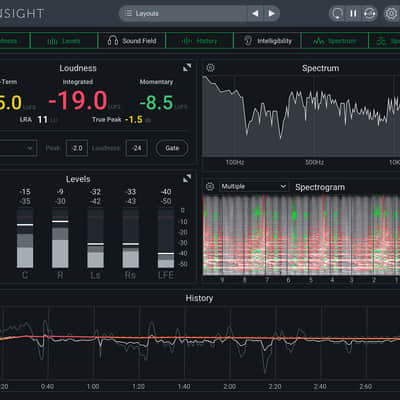
Insight 2 is a comprehensive metering and audio analysis plug-in that is a core component of award-winning post production studios, music studios, and broadcast facilities. It is perfect for visualizing changes made during mixing and mastering, troubleshooting problematic mixes, monitoring the intelligibility of your dialogue, and ensuring compliance with broadcast loudness standards.
With Insight 2, you can immediately detect potential mix problems through real-time visual monitoring and color-coded alerts. Customize your view by choosing the meters you want to see, set your preferred targets, and resize the window to fit your current workflow. You can also route any audio track in your DAW to Insight 2 to quickly check loudness, levels, intelligibility, phase, frequency content, and more.
With layouts and targets for every stage of post and music production, you can deliver the optimum mix the first time around. Save time and money when mixing and mastering audio by monitoring your audio with the highest accuracy. Keep an eye as well as an ear on your mix at all times with Insight 2!
Perfect for music and post production
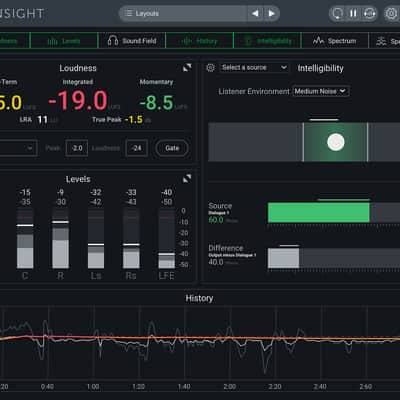
You can now measure the intelligibility of your dialogue compared to the rest of the mix to ensure that your dialogue level can be clearly heard in different listening environments. iZotope's own powerful DSP is used to determine when levels in your mix are preventing the dialogue from being clearly heard.
New Style
Updated Look & Feel
Insight 2 has an updated design that matches the rest of the iZotope family. The most important targets have been emphasized to make Insight 2 easier to read at a glance.
Resizing
Now you can easily resize individual meters in the main window by clicking and dragging between two meter frames. Additionally, the main window can now be resized to be as small as the smallest meter—perfect for throwing your loudness meters up in the corner of your third monitor!
Customize Your Layout
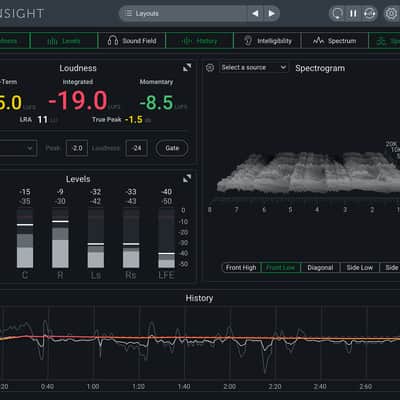
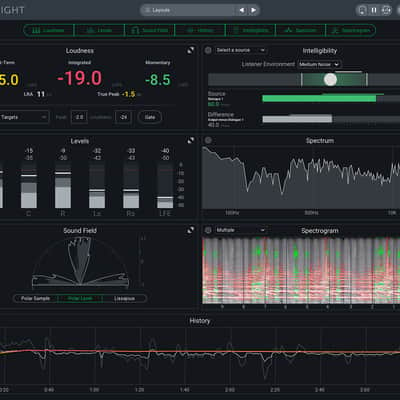
Insight 2 is customizable and flexible for your perfect setup. You can display and resize any meter you want or select one of the many Layouts designed for specific post and music production settings.
New Features
Intelligibility Meter
A brand new addition to Insight 2, The Intelligibility Meter provides guidance on whether dialogue is likely to be overshadowed by the loudness of the rest of your mix. Using iZotope Relay or other compatible plug-ins, Insight 2 takes information from your dialogue track and gives you the best recommendation on where your dialogue should be when compared to the rest of your mix. Select from different target Listening Environments, ranging from low to high noise, to check how the intelligibility of your dialogue holds up for listeners in those spaces. Now it’s even easier to ensure your dialogue tracks are loud and clear on any sound source!
Multichannel Support
Analyze your audio in surround sound up to Dolby Atmos 7.1.2.
Deliver for Today’s Standards
Set your loudness targets for EBU R128, BS.1770-1, BS.1770-2/3/4, ATSC A/85, OP-59, and more.
iZotope Relay
Perform detailed analysis by routing audio from any tracks or buses to Insight 2 with Relay. Enjoy the flexibility of using any plug-in while still getting all the benefits of our innovative new tools across your entire mix.
Relay Features:
Easily show or hide meters with the meter selection buttons at the top of the screen.
Insight 2 Uncludes Meters For:
Compatibility
Operating system requirements
Installation Instructions
What it is:
A plug in for visualizing audio.
How we use it:
Fix the problematic areas of your mix by detecting them with visual tools.
Why it's cool:
Unlike most spectrum analyzers, Insight allows you to customize how you see your metering.Insight 2 | Intelligent Metering for Music & Post
Introducing Insight 2
Insight 2 is a comprehensive metering and audio analysis plug-in that is a core component of award-winning post production studios, music studios, and broadcast facilities. It is perfect for visualizing changes made during mixing and mastering, troubleshooting problematic mixes, monitoring the intelligibility of your dialogue, and ensuring compliance with broadcast loudness standards.
With Insight 2, you can immediately detect potential mix problems through real-time visual monitoring and color-coded alerts. Customize your view by choosing the meters you want to see, set your preferred targets, and resize the window to fit your current workflow. You can also route any audio track in your DAW to Insight 2 to quickly check loudness, levels, intelligibility, phase, frequency content, and more.
With layouts and targets for every stage of post and music production, you can deliver the optimum mix the first time around. Save time and money when mixing and mastering audio by monitoring your audio with the highest accuracy. Keep an eye as well as an ear on your mix at all times with Insight 2!
Perfect for music and post production
- Updated look and feel
- Re-designed to be easier to use
- Current loudness standards
- Multichannel support up to Dolby Atmos 7.1.2
- Ensure that dialogue is clear in the mix with the Intelligibility Meter
- Resize the meters and window as small or large as wanted
- Colored warnings available for Level meters
- Expanded inter-plugin communication with iZotope Relay
- Introducing the Intelligibility Meter
You can now measure the intelligibility of your dialogue compared to the rest of the mix to ensure that your dialogue level can be clearly heard in different listening environments. iZotope's own powerful DSP is used to determine when levels in your mix are preventing the dialogue from being clearly heard.
New Style
Updated Look & Feel
Insight 2 has an updated design that matches the rest of the iZotope family. The most important targets have been emphasized to make Insight 2 easier to read at a glance.
Resizing
Now you can easily resize individual meters in the main window by clicking and dragging between two meter frames. Additionally, the main window can now be resized to be as small as the smallest meter—perfect for throwing your loudness meters up in the corner of your third monitor!
Customize Your Layout
Insight 2 is customizable and flexible for your perfect setup. You can display and resize any meter you want or select one of the many Layouts designed for specific post and music production settings.
New Features
Intelligibility Meter
A brand new addition to Insight 2, The Intelligibility Meter provides guidance on whether dialogue is likely to be overshadowed by the loudness of the rest of your mix. Using iZotope Relay or other compatible plug-ins, Insight 2 takes information from your dialogue track and gives you the best recommendation on where your dialogue should be when compared to the rest of your mix. Select from different target Listening Environments, ranging from low to high noise, to check how the intelligibility of your dialogue holds up for listeners in those spaces. Now it’s even easier to ensure your dialogue tracks are loud and clear on any sound source!
Multichannel Support
Analyze your audio in surround sound up to Dolby Atmos 7.1.2.
Deliver for Today’s Standards
Set your loudness targets for EBU R128, BS.1770-1, BS.1770-2/3/4, ATSC A/85, OP-59, and more.
iZotope Relay
Perform detailed analysis by routing audio from any tracks or buses to Insight 2 with Relay. Enjoy the flexibility of using any plug-in while still getting all the benefits of our innovative new tools across your entire mix.
Relay Features:
- Inter-plugin communication with compatible iZotope products (Intelligibility Meter, Tonal Balance Control, Masking Meter, Visual Mixer, and more)
- Delay Offset: align multi-mic'd sources and correcting phase issues in your tracks
- Phase Invert: quickly compare and contrast the phase of tracks in your mix
- Sum to Mono: audition your stereo audio data to see how it translates to mono listening formats
- Swap Channels: Switch left and right channels of any stereo track to audition the stereo image and check for balance issues
- High Pass Filter: Clean up and control the sub frequency content in your tracks with a simple High Pass Filter in Relay
Easily show or hide meters with the meter selection buttons at the top of the screen.
Insight 2 Uncludes Meters For:
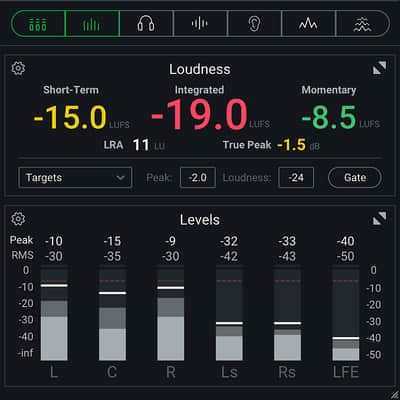
- Loudness
- Levels
- Sound Field
- History
- Intelligibility
- Spectrum
- Spectrogram
Compatibility
Operating system requirements
- Mac OS X 10.8–10.11
- Windows 7, 8, and 10
Native AAX 64 bit, RTAS 32 bit, Audiosuite DPM 32 bit and AAX 64 bit, AU 32 and 64 bit, VST 2 32 and 64 bit, VST 3
Plug-in host compatibilityPro Tools (10–12.4), Ableton Live (9.5), Logic Pro X (version 10.2), Nuendo 7 / Cubase 8.5, Audition CC 2015, Sonar, PreSonus Studio One, Media Composer 7.0.5 & 8.4.5, Premiere Pro CC 2015, Final Cut X, Sony Sound Forge (Windows: V.11.299; Mac: V.2.5.133), Digital Performer, Reaper
Installation Instructions
First Time Users: If you haven't already, create an account with iZotope: http://www.izotope.com/en/account/log-in/
- Download your installer (Mac or PC) from your account. Once the file has finished downloading to your computer, you will need to open and run the installer.
- Once you have gone through the install wizard and accepted the software license agreement, you will be prompted to select which features you would like to install. If you are not sure what you will need, it is advisable to just leave the default options ticked and press 'Continue'.
- Once you have selected your install features, press 'Continue' and start the 'Install'.
- Near the end of the installation, you will be prompted if you would like to 'check for updates to iZotope software', press yes on this prompt, and your plug-ins will be scanned to see if there are any newer versions for any of your iZotope products.
- If any updates are found, you will be prompted with an updates window where you can follow the on screen prompt.
- Once the installation is complete and all checks have been run, you will be prompted with an installation was successful window, which you can then 'Close'.
- When the installation is finished, you will next need to open and authorize the product. It is always best practice to authorize using the standalone version (if available).
- The first time launching for product, you will be prompted with an Authorization box. After clicking 'Authorize' you will need to enter your serial number and the Name and E-mail address used to create your iZotope user account. [If you intend to use your software offline, here you will need to press the 'Offline Authorization' button and follow the on screen instructions.]
- After pressing 'Authorize' you will see a pop-up box confirming your details for you to then press 'Submit'. Your software should now be fully authorized and ready to go!
- Download your installer (Mac or PC) from your account. Once the file has finished downloading to your computer, you will need to open and run the installer.