Inspired by Van Halen "Jump" - Pro Tools Session - Reverb Exclusive

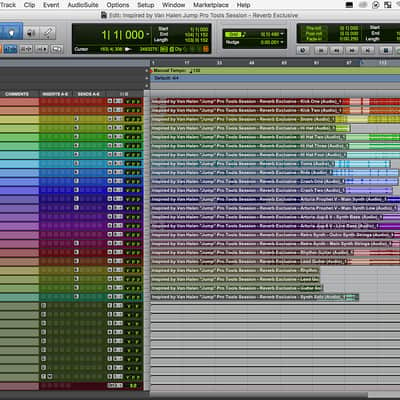
Inspired by Van Halen "Jump" - Pro Tools Session - Reverb Exclusive
New PriceFREE
Instant Download
This seller is currently away
See similar gear from other Reverb sellers
Listed:over a month ago
Views:1,662
Saves:29
Downloads:246

Chicago, IL, United States
Our users rate Reverb
An exclusive Live arrangement and sound set of Van Halen's hit song "Jump".
What it is:
A MIDI arrangement and customized set of sounds emulating Van Halen's "Jump".
How we use it:
Learn the production techniques and other tactics behind a Van Halen hit.
Why it's cool:
The Van Halen "Jump" Pro Tools Session uses only built-in sounds, Arturia's Prophet V3, Arturia’s Jup-8 V3, and effects in Pro Tools to recreate the sounds of Van Halen's s celebrated work. An exclusive Pro Tools Session designed by the Reverb team that captures the sound and personality of Van Halen's iconic track, "Jump".
Includes:
Get Arturia Prophet V3: Arturia's Prophet V3
Get Arturia Jup-83 V: Arturia’s Jup-8 V3
Compatibility
Installation Instructions
What it is:
A MIDI arrangement and customized set of sounds emulating Van Halen's "Jump".
How we use it:
Learn the production techniques and other tactics behind a Van Halen hit.
Why it's cool:
The Van Halen "Jump" Pro Tools Session uses only built-in sounds, Arturia's Prophet V3, Arturia’s Jup-8 V3, and effects in Pro Tools to recreate the sounds of Van Halen's s celebrated work. An exclusive Pro Tools Session designed by the Reverb team that captures the sound and personality of Van Halen's iconic track, "Jump".
Includes:
- MIDI arrangement of the track.
- Custom-designed sounds using Logic, Arturia's Prophet V3, Arturia’s Jup-8 V3, with Pro Tools included effects devices.
- Custom Instrument that can be saved and reused in any Pro Tools Session
Get Arturia Prophet V3: Arturia's Prophet V3
Get Arturia Jup-83 V: Arturia’s Jup-8 V3
Compatibility
- Windows PC or Apple Mac
- Pro Tools 12
Installation Instructions
- Download the .zip file
- Find the file in your Downloads folder
- Double-click the file, which will unzip the folder
- Double-click the Pro Tools Session - Inspired by Van Halen "Jump" - Pro Tools Session - Reverb Exclusive, which will launch Pro Tools
- Press "play" in the Pro Tools Arrangement view
- Hear Van Halen "Jump"