Waves Clavinet
Price€78.41
Incl. VAT
Instant Download
This gear has sold
See similar gear from other Reverb sellers
Listed:over a month ago
Views:1,248
Saves:7
Offers:0

Chicago, IL, United States
Our users rate Reverb
The iconic D6 Clavinet, accurately sampled and funkier than ever.
What it is:
A virtual Clavinet from Waves.
How we use it:
Classic Clav tones from "Superstition" to "Outta Space" and beyond.
Why it's cool:
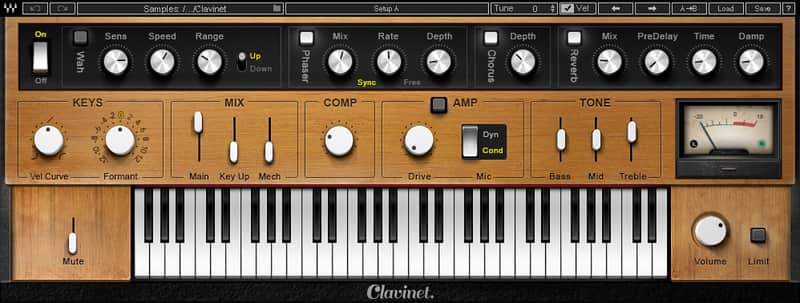
Calvinet provides an array of deep sonic textures - classic and contemporary - in a simple, user-friendly interface. Accurately sampled from one of the funkiest keyboards ever created: the iconic D6 model Clavinet famous for its percussive playability and gritty sound.
The original Clav has always held a special appeal in funk, fusion, rock and soul music for its unique melodic twang and sonic versatility, from brilliant, vibrant, nitty and gritty to soft, rich, mellow tones.
For this instrument, we meticulously sampled every texture, articulation and hammer tip string-striking mechanic of the authentic D6 Clavinet in both the muted and unmuted modes, recreating all the dynamic control, feel and expression of the original funkified icon.
Using only a few controls, you can achieve an array of deep sonic textures, capturing the distinctive timbre of the Clavi’s unique single-coil pickups. Choose from the selection of factory presets, featuring patches modeled after Stevie Wonder’s “Superstition,” Billy Preston’s “Outta Space” and other classic songs; or shape your own tones using the built-in auto-wah, amp overdrive and other effects.
Compatibility
Mac:
CPU
Memory
Operating System
Screen Resolution
Support for Visually Impaired Users
Windows:
CPU
Memory
Operating System
Screen Resolution
Installation Instructions
What it is:
A virtual Clavinet from Waves.
How we use it:
Classic Clav tones from "Superstition" to "Outta Space" and beyond.
Why it's cool:
Calvinet provides an array of deep sonic textures - classic and contemporary - in a simple, user-friendly interface. Accurately sampled from one of the funkiest keyboards ever created: the iconic D6 model Clavinet famous for its percussive playability and gritty sound.
The original Clav has always held a special appeal in funk, fusion, rock and soul music for its unique melodic twang and sonic versatility, from brilliant, vibrant, nitty and gritty to soft, rich, mellow tones.
For this instrument, we meticulously sampled every texture, articulation and hammer tip string-striking mechanic of the authentic D6 Clavinet in both the muted and unmuted modes, recreating all the dynamic control, feel and expression of the original funkified icon.
Using only a few controls, you can achieve an array of deep sonic textures, capturing the distinctive timbre of the Clavi’s unique single-coil pickups. Choose from the selection of factory presets, featuring patches modeled after Stevie Wonder’s “Superstition,” Billy Preston’s “Outta Space” and other classic songs; or shape your own tones using the built-in auto-wah, amp overdrive and other effects.
Compatibility
Mac:
CPU
- Intel Core i5 / i7 / Xeon
Memory
- 8 GB RAM
- 8 GB free disk space on the system drive
Operating System
- 10.10.5 - 10.12.5
Screen Resolution
- Minimum: 1024x768
- Recommended: 1280x1024 / 1600x1024
- USB displays are not supported as the primary display.
Support for Visually Impaired Users
- Mac OS Sierra 10.12.4
- VoiceOver Utility enabled
- Pro Tools 12.7
- Logic 10.3.1
- Please note: Preset management via the WaveSystem Toolbar is currently not supported (will be added soon).
Windows:
CPU
- Intel Core i3 / i5 / i7 / Xeon / AMD Quad-Core
Memory
- 4 GB RAM
- 8 GB free disk space on the system drive
Operating System
- Windows 7 with SP1 64 bit
- Windows 8.1 64 bit
- Windows 10 64 bit
Screen Resolution
- Minimum: 1024x768
- Recommended: 1280x1024 / 1600x1024
Installation Instructions
- Create an account: https://www.waves.com/create-account (if you have an account, skip this step)
- Register the serial number we emailed: https://www.waves.com/account/register
- Download and install Waves Central for Mac | Windows.
- If you already have Waves Central installed, skip to step 4. - Launch Waves Central.
- Windows: via the desktop shortcut or Start Menu > All Programs > Waves.
- Mac: Applications > Waves Central. - Log into Waves Central using your Waves account information.
- Click on Easy Install & Activate.
- Select the products you wish to install & activate on this computer.
- Click on the Install & Activate button.
| Brand | |
|---|---|
| Model |
|
| Categories |
Product safety information may be available here.