











Reveal Sound Spire
New Price€143.92
Incl. VAT
Instant Download
This gear has sold
See similar gear from other Reverb sellers
Listed:over a month ago
Views:1,141
Saves:12
Offers:10

Chicago, IL, United States
Our users rate Reverb
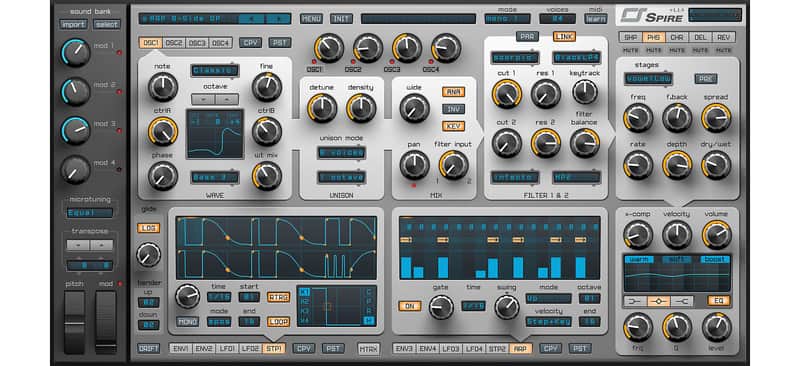
A soft synth that feels and sounds like a hardware synthesizer.
What it is:
A polyphonic synth that is a go to for sound designers and producers alike.
How we use it:
Use on any production to create an atmosphere like no other synth can do.
Why it's cool:
With over 800+ presets you will always find inspiration with this massive sound machine.ANALOG / DIGITAL Superiority
Polyphonic Soft Synth with 4 Multimode Oscillators, Unison Engine with 9 Voices Per Oscillator, 2 Multimode Filters, Arpeggiator, Step Sequencer, Multiband Compressor, Flexible Modulation Options, and 800+ Factory Presets.
VERSATILE OSCILLATORS
Over 800 factory presets including:
UI Scaling 100%, 150%, 200% for greater comfort.
Compatibility
Windows:
Supported DAWs:
Installation Instructions
Installation Instructions:
What it is:
A polyphonic synth that is a go to for sound designers and producers alike.
How we use it:
Use on any production to create an atmosphere like no other synth can do.
Why it's cool:
With over 800+ presets you will always find inspiration with this massive sound machine.ANALOG / DIGITAL Superiority
Polyphonic Soft Synth with 4 Multimode Oscillators, Unison Engine with 9 Voices Per Oscillator, 2 Multimode Filters, Arpeggiator, Step Sequencer, Multiband Compressor, Flexible Modulation Options, and 800+ Factory Presets.
VERSATILE OSCILLATORS
- 4x multimode polymorphing oscillators
- Classic
- Noise
- FM
- AMSync
- SawPWM
- 9x unison voices on each oscillator
- Spread unison voices by chords and octaves
- Capable of imitate different types of unisons like supersaw, hypersaw
- 2x multimode filters with analogue and digital types of filtering
- Perfecto
- Infecto
- Acido
- Scorpio
- Combo
- Shaper/Decimator
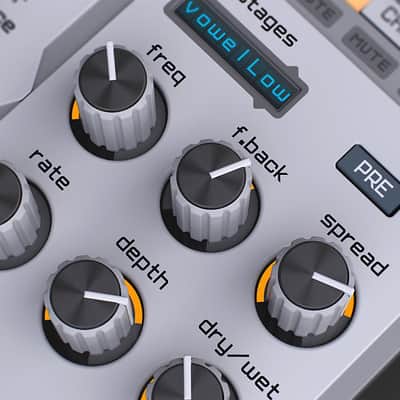
- Phaser/Vowel
- Chorus/Flanger
- Delay
- Reverb
- 4x Macroses
- 4x Envelopes
- 4x LFOs with morphing shapes
- 15x Matrix slots each of equipped with 2x sources and 4x targets
- X-Comp (Multiband Compressor)
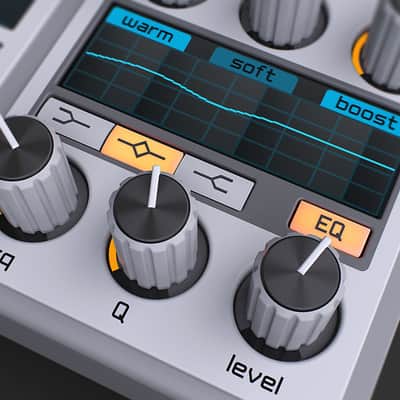
- 3-band EQ
Over 800 factory presets including:
- Complex arpeggios
- Bass sequences
- Versatile assortment of leads
- Exhilarating pads
- Plucks
- Drums
- FXs
UI Scaling 100%, 150%, 200% for greater comfort.
Compatibility
Windows:
- Windows 7, 8, 10 (64 and 32 bit versions)
- Mac OS X 10.8 or later
Supported DAWs:
- Steinberg Cubase
- Apple Logic Pro
- Presonus Studio One
- Reaper
- Ableton Live
- Bitwig
- Pro Tools 11 or higher
Installation Instructions
Installation Instructions:
- After you purchase your Reveal Sound product, Reverb SYNC will email your serial number
- To activate that serial number, go to: http://reveal-sound.com/activation.html
- Fill out the form
- After you have filled in the following form, a personal product license key will be sent to you by e-mail immediately
- You will be directed to download the plugin and activate it
- If Ableton Live is closed, open it and skip to #5.
- If Ableton Live is already open, go to Preferences.
- Go to Files & Folder.
- Click "Rescan plugins".
- Find the plugin in the Ableton plugins folder in the sidebar.
- Drag-and-drop the plugin onto your track at the bottom of the screen.
- Open Logic Pro X. Newly installed plugins should be detected automatically every time Logic is opened.
- If you've downloaded an effect or utility plugin, these can be used on an insert for any track in the mixer.
- Create a software instrument track if you downloaded a virtual instrument plugin.
- Under Default Patch, go to AU Instruments and choose the plugin you just installed.
- Open Pro Tools. Newly installed plugins should be detected automatically every time Pro Tools is opened.
- If you've downloaded an effect or utility plugin, these can be used on an insert for many types of tracks (Audio, Aux, Instrument, Master Fader...)
- If you’ve downloaded a software instrument, create a new Instrument track.
- Navigate to the Mixer and locate the newly created Instrument track.
- Select the desired instrument plugin by clicking on any of the Inserts on the Instrument track.
- Go to the Reverb SYNC Software and plugin Collection.
- Choose your desired plugin.
- Reverb will auto-detect your platform, so simply click the download button.
- Continue the installation process by following the prompt.
- Hover your mouse over the smart control button.
- Click Show Inspector icon.
- Click on plugins and choose your desired plugin.
| Brand | |
|---|---|
| Model |
|
| Categories |
Product safety information may be available here.