Ohm Force Symptohm PE Synthesizer
Ohm Force Symptohm PE Synthesizer
PrecioGRATIS
Descarga instantánea
Este anuncio ha terminado
Ver equipos similares de otros vendedores de Reverb
Publicado:hace más de un mes
Visitas:15.261
Guardados:86
Descargas:8.856

Chicago, IL, Estados Unidos
Nuestros usuarios valoran Reverb
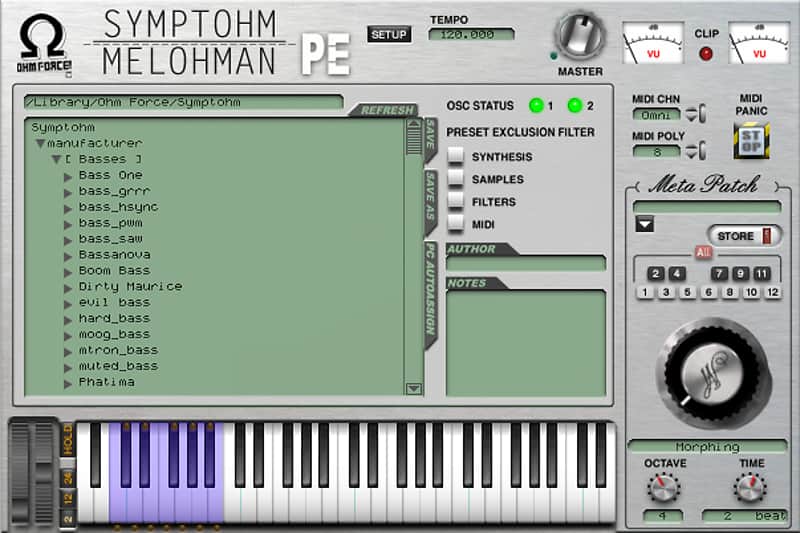
An expansive synthesizer packed with over 1,200 customizable presets.
What it is:
A sample-based synthesizer capable of recreating a wide range of instruments and sounds.
How we use it:
Bread and butter tones that rapidly transform into wild new sounds.
Why it's cool:
The meta-patch feature is mind-blowing.Free ticket to a long, amazing journey. Need a synth with a lot of good sounds to use without too much knob-tweaking complexity? Here comes Symptohm:Melohman in a free Performer Edition, giving you access to all of its mother's factory presets and some other customizing possibilities. No doubt you'll end up wondering where these sounds come from.
1,200+ presets
Explore all of Symptohm's presets. They sound exactly like they do on the standard edition, with the sophisticated synthesis engine running under the hood. And while you'll only have scratched the surface after going through thousands of patches, you'll still have heard of what the top of the iceberg is capable of.
Throw in your samples
The Oscillators buttons allow you to change the waveforms. The default ones are fine, but why not set your own samples? Be creative. Have fun. Add the Melohman feature and you get a truly exciting and powerful tool which you'll spend hours and hours with before shouting like a mad monkey: "I WANT MORE!"
Compatibility
Installation Instructions
General Instructions:
How to install plugins in Ableton Live:
What it is:
A sample-based synthesizer capable of recreating a wide range of instruments and sounds.
How we use it:
Bread and butter tones that rapidly transform into wild new sounds.
Why it's cool:
The meta-patch feature is mind-blowing.Free ticket to a long, amazing journey. Need a synth with a lot of good sounds to use without too much knob-tweaking complexity? Here comes Symptohm:Melohman in a free Performer Edition, giving you access to all of its mother's factory presets and some other customizing possibilities. No doubt you'll end up wondering where these sounds come from.
1,200+ presets
Explore all of Symptohm's presets. They sound exactly like they do on the standard edition, with the sophisticated synthesis engine running under the hood. And while you'll only have scratched the surface after going through thousands of patches, you'll still have heard of what the top of the iceberg is capable of.
Throw in your samples
The Oscillators buttons allow you to change the waveforms. The default ones are fine, but why not set your own samples? Be creative. Have fun. Add the Melohman feature and you get a truly exciting and powerful tool which you'll spend hours and hours with before shouting like a mad monkey: "I WANT MORE!"
Compatibility
The majority of plugins hosted on Reverb run on both Mac and Windows operating systems. General minimum requirements are as follows:
Mac:
- Mac OS X 10.7 - 10.11.
- Pro Tools, Ableton Live, Logic Pro, or any host compatible with VST/AAX/AU.
- Intel Core i3 / i5 / i7 / Xeon
- 2GB RAM.
- Display Resolution of at least 1280 x 1024px
PC:
- Windows 7 - 10.
- Pro Tools, Ableton Live, or any host compatible with VST/AAX.
- Intel Core i3 / i5 / i7 / Xeon
- 2GB RAM.
- Display Resolution of at least 1280 x 1024px.
Installation Instructions
General Instructions:
- We auto-detect your computer operating system, so just click the download button above
- Find the downloaded plugin (it’s in your computer’s download folder) and double click it
- A plugin installer window will open, so go through the installation process
- We will also send you an email with a link to re-download in case you need it
How to install plugins in Ableton Live:
- If Ableton is closed, open it and skip to #5
- If Ableton is already open, go to Preferences
- Go to Files & Folder
- Click “Rescan plugins”
- Find the plugin in the Ableton plugins folder in the sidebar
- Drag-and-drop the plugin onto your track at the bottom of the screen
- Open Logic Pro X
- Create a software instrument track if you downloaded a virtual instrument plugin
- Under Default Patch, go to AU Instruments and choose the plugin you just installed
- If you downloaded an effect or utility plugin, you can insert them on the mixer
- Click the Track menu and create a new track
- Select any of the available inserts
- Go to Multi-Channel plugins, then Instruments to find your new virtual instrument plugin
| Marca | |
|---|---|
| Modelo |
|
| Categorías |
La información de seguridad del producto se encuentra disponible aquí.