



iZotope BreakTweaker Expanded
New Price€21.06
Incl. VAT
Instant Download
This gear has sold
See similar gear from other Reverb sellers
Listed:over a month ago
Views:181
Saves:2
Offers:2

Chicago, IL, United States
Our users rate Reverb
Forget everything you thought you knew about rhythm.
What it is:
A drum sculpting and beat sequencing machine.
How we use it:
Create dynamic and evolving beats.
Why it's cool:
The depth to which you can manipulate your audio makes BreakTweaker a fantastic choice for perfectionists and the adventurous.Make beats you've never heard before. Built on a futuristic MicroEdit Engine, BreakTweaker turns everything you know about rhythm on its head.
Designed by BT and developed by iZotope, BreakTweaker is not just a drum machine: it's a drum sculpting and beat sequencing machine that blurs the line between rhythm and melody. Give your beats an evolving depth that gets better the longer they play. Use rhythmic slicing to drive everything from pitched melodic lines to sweeping rhythmic concoctions. Top it all off with the best drum sample library in existence, curated by BT, iZotope, and top producers today. Explore a new era of rhythmic possibilities with this forward-thinking and forward-sounding instrument.
KEY FEATURES
BreakTweaker is the beat machine of the future. Powered by three distinct modules, the Sequencer, the Generator, and the MicroEdit Engine, it’s a wildly creative rhythmic instrument that can be used with any DAW and MIDI controller. For instant gratification, get started with the diverse presets and content in the Factory Library, a showcase of BreakTweaker’s breadth and sonic capabilities. When you want to get deeper, break new sonic ground with BreakTweaker’s paradise of tweaky controls and settings.
The Sequencer
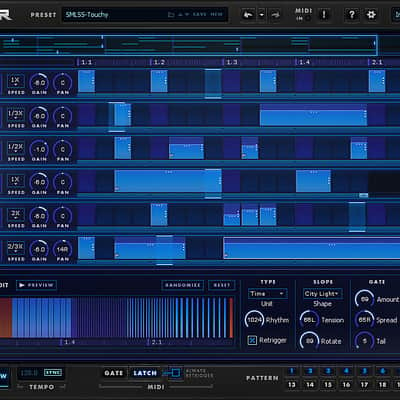
Assemble pattern-based beats in the Sequencer, which features six tracks for layering your sounds. The Sequencer can store up to 24 different step patterns, launchable via MIDI for on-the fly remixing. Design beats that evolve over time with BreakTweaker’s advanced isorhythmic step sequencing, which makes it possible for each track to have a unique tempo and step length.
The Generator
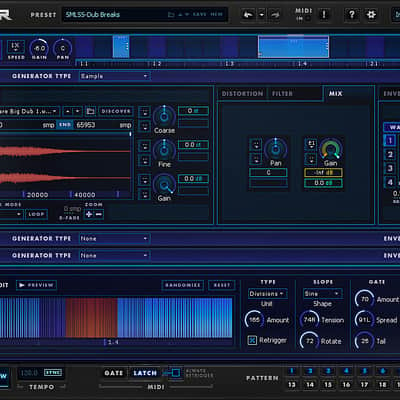
Sculpt new drum sounds and textures with the Generator. This powerful drum synthesis module defines the sounds for each Sequencer track. The Generator supports morphing wavetable synthesis or one-shot sample loading, polished off with dual-stage distortions and vintage-modeled filters. Four LFOs with unique wavetable shapes, and four Envelopes allow vast modulation possibilities for almost every single Generator parameter. As a bonus, every Sequencer track supports up to three Generators for developing even deeper sonic complexity.
The MicroEdit Engine
Once you’ve perfected the ultimate set of drum sounds and sequenced your patterns, it’s time for a whole new method of sound design. Enter the MicroEdit Engine. A “MicroEdit” is the division of a single step within your pattern into potentially thousands of slices. These slices can then be contoured and shaped to create harmonic, pitched, and rhythmic effects, resulting in new textures that add that extra spice to an evolving beat. By pushing the limits of the brain’s ability to perceive sound, the MicroEdit Engine blurs the line between rhythm and pitch, inspiring beats you’ve never heard before.
The Factory Library
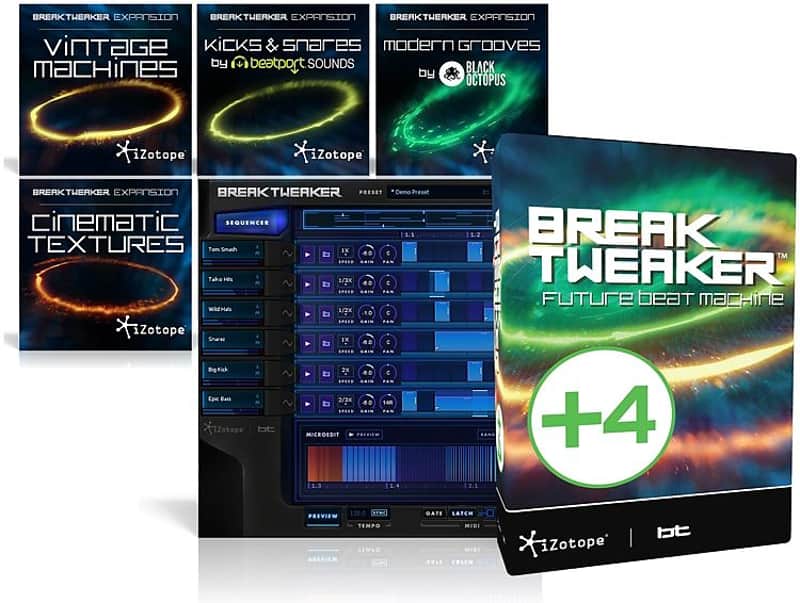
Bringing sounds, patterns, and MicroEdits together into mind-boggling beats, the BreakTweaker Factory Library comes with over 80 global presets that are ready to kickstart your next project. The Factory Library also features over 2 GB of royalty-free sample content designed by electronic production pros. Specializing in a wide variety of percussive sounds, sample categories range from studio essentials like “Kick” and “Snare” to intriguing possibilities like “Glitch”and “Film”.PLUS: Expand your sonic palette with BreakTweaker’s add-on Expansion libraries, suited to a variety of production styles. Experience analog punch with Vintage Machines, rhythmic tension and release with Cinematic Textures, industry-defining percussion with Kicks & Snares by Beatport Sounds, and the crisp, clean hits of Modern Grooves by Black Octopus.
Compatibility
Installation Instructions
What it is:
A drum sculpting and beat sequencing machine.
How we use it:
Create dynamic and evolving beats.
Why it's cool:
The depth to which you can manipulate your audio makes BreakTweaker a fantastic choice for perfectionists and the adventurous.Make beats you've never heard before. Built on a futuristic MicroEdit Engine, BreakTweaker turns everything you know about rhythm on its head.
Designed by BT and developed by iZotope, BreakTweaker is not just a drum machine: it's a drum sculpting and beat sequencing machine that blurs the line between rhythm and melody. Give your beats an evolving depth that gets better the longer they play. Use rhythmic slicing to drive everything from pitched melodic lines to sweeping rhythmic concoctions. Top it all off with the best drum sample library in existence, curated by BT, iZotope, and top producers today. Explore a new era of rhythmic possibilities with this forward-thinking and forward-sounding instrument.
KEY FEATURES
- Manipulate audio at a molecular level: Reinvent any beat by controlling pitch, rhythm, and texture at the finest resolution on the market.
- Experiment with stunning content: Explore a full range of presets, drum samples, and wavetables designed by today's top musicians and DJs, including BT.
- Invent completely new rhythms: Create complex polyrhythmic lines with unique isorhythm and playback speed settings.
- Craft the perfect drum sound: Blend drum samples with robust synthesizer features to create sounds that are the best of both worlds.
- Take control of your beats: Easily trigger and sequence complex patterns and samples using any MIDI controller.
BreakTweaker is the beat machine of the future. Powered by three distinct modules, the Sequencer, the Generator, and the MicroEdit Engine, it’s a wildly creative rhythmic instrument that can be used with any DAW and MIDI controller. For instant gratification, get started with the diverse presets and content in the Factory Library, a showcase of BreakTweaker’s breadth and sonic capabilities. When you want to get deeper, break new sonic ground with BreakTweaker’s paradise of tweaky controls and settings.
The Sequencer
Assemble pattern-based beats in the Sequencer, which features six tracks for layering your sounds. The Sequencer can store up to 24 different step patterns, launchable via MIDI for on-the fly remixing. Design beats that evolve over time with BreakTweaker’s advanced isorhythmic step sequencing, which makes it possible for each track to have a unique tempo and step length.
The Generator
Sculpt new drum sounds and textures with the Generator. This powerful drum synthesis module defines the sounds for each Sequencer track. The Generator supports morphing wavetable synthesis or one-shot sample loading, polished off with dual-stage distortions and vintage-modeled filters. Four LFOs with unique wavetable shapes, and four Envelopes allow vast modulation possibilities for almost every single Generator parameter. As a bonus, every Sequencer track supports up to three Generators for developing even deeper sonic complexity.
The MicroEdit Engine
Once you’ve perfected the ultimate set of drum sounds and sequenced your patterns, it’s time for a whole new method of sound design. Enter the MicroEdit Engine. A “MicroEdit” is the division of a single step within your pattern into potentially thousands of slices. These slices can then be contoured and shaped to create harmonic, pitched, and rhythmic effects, resulting in new textures that add that extra spice to an evolving beat. By pushing the limits of the brain’s ability to perceive sound, the MicroEdit Engine blurs the line between rhythm and pitch, inspiring beats you’ve never heard before.
The Factory Library
Bringing sounds, patterns, and MicroEdits together into mind-boggling beats, the BreakTweaker Factory Library comes with over 80 global presets that are ready to kickstart your next project. The Factory Library also features over 2 GB of royalty-free sample content designed by electronic production pros. Specializing in a wide variety of percussive sounds, sample categories range from studio essentials like “Kick” and “Snare” to intriguing possibilities like “Glitch”and “Film”.PLUS: Expand your sonic palette with BreakTweaker’s add-on Expansion libraries, suited to a variety of production styles. Experience analog punch with Vintage Machines, rhythmic tension and release with Cinematic Textures, industry-defining percussion with Kicks & Snares by Beatport Sounds, and the crisp, clean hits of Modern Grooves by Black Octopus.
Compatibility
- Format: AAX, RTAS, VST, VST 3, AU
- Mac Hardware Requirements: Intel Multicore Processor, 4GB RAM minimum
- PC Hardware Requirements: Multicore Processor, 4GB RAM minimum
- Mac OS Requirements: OS X 10.6.8-10.10
- PC OS Requirements: Windows 7 or later
Installation Instructions
First Time Users:
If you haven't already, create an account with iZotope: http://www.izotope.com/en/account/log-in/
- Download your installer (Mac or PC) from your account. Once the file has finished downloading to your computer, you will need to open and run the installer.
- Once you have gone through the install wizard and accepted the software license agreement, you will be prompted to select which features you would like to install. If you are not sure what you will need, it is advisable to just leave the default options ticked and press 'Continue'.
- Once you have selected your install features, press 'Continue' and start the 'Install'.
- Near the end of the installation, you will be prompted if you would like to 'check for updates to iZotope software', press yes on this prompt, and your plug-ins will be scanned to see if there are any newer versions for any of your iZotope products.
- If any updates are found, you will be prompted with an updates window where you can follow the on screen prompt.
- Once the installation is complete and all checks have been run, you will be prompted with an installation was successful window, which you can then 'Close'.
- When the installation is finished, you will next need to open and authorize the product. It is always best practice to authorize using the standalone version (if available).
- The first time launching for product, you will be prompted with an Authorization box. After clicking 'Authorize' you will need to enter your serial number and the Name and E-mail address used to create your iZotope user account. [If you intend to use your software offline, here you will need to press the 'Offline Authorization' button and follow the on screen instructions.]
- After pressing 'Authorize' you will see a pop-up box confirming your details for you to then press 'Submit'. Your software should now be fully authorized and ready to go!
- We auto-detect your computer operating system, so just click the download button above.
- Find the downloaded plugin (it's in your computer's download folder, or wherever you've chosen to save it) and double click the installer.
- A plugin installer window will open. Simply go through the installation process.
- We will also send you an email with a link to re-download in case you need it.
- If Ableton Live is closed, open it and skip to #5.
- If Ableton Live is already open, go to Preferences.
- Go to Files & Folder.
- Click "Rescan plugins".
- Find the plugin in the Ableton plugins folder in the sidebar.
- Drag-and-drop the plugin onto your track at the bottom of the screen.
- Open Logic Pro X. Newly installed plugins should be detected automatically every time Logic is opened.
- If you've downloaded an effect or utility plugin, these can be used on an insert for any track in the mixer.
- Create a software instrument track if you downloaded a virtual instrument plugin.
- Under Default Patch, go to AU Instruments and choose the plugin you just installed.
- Open Pro Tools. Newly installed plugins should be detected automatically every time Pro Tools is opened.
- If you've downloaded an effect or utility plugin, these can be used on an insert for many types of tracks (Audio, Aux, Instrument, Master Fader...)
- If you’ve downloaded a software instrument, create a new Instrument track.
- Navigate to the Mixer and locate the newly created Instrument track.
- Select the desired instrument plugin by clicking on any of the Inserts on the Instrument track.
- Go to the Reverb SYNC Software and plugin Collection.
- Choose your desired plugin.
- Reverb will auto-detect your platform, so simply click the download button.
- Continue the installation process by following the prompt.
- Hover your mouse over the smart control button.
- Click Show Inspector icon.
- Click on plugins and choose your desired plugin.
| Brand | |
|---|---|
| Model |
|
| Categories |
Product safety information may be available here.