Waves Kramer Master Tape
New Price€231.93
Instant Download
This gear has sold
See similar gear from other Reverb sellers
Listed:over a month ago
Views:2,362
Saves:32
Offers:7

Chicago, IL, United States
Our users rate Reverb
A rare vintage 1/4" reel-to-reel, beloved by Eddie Kramer.
What it is:
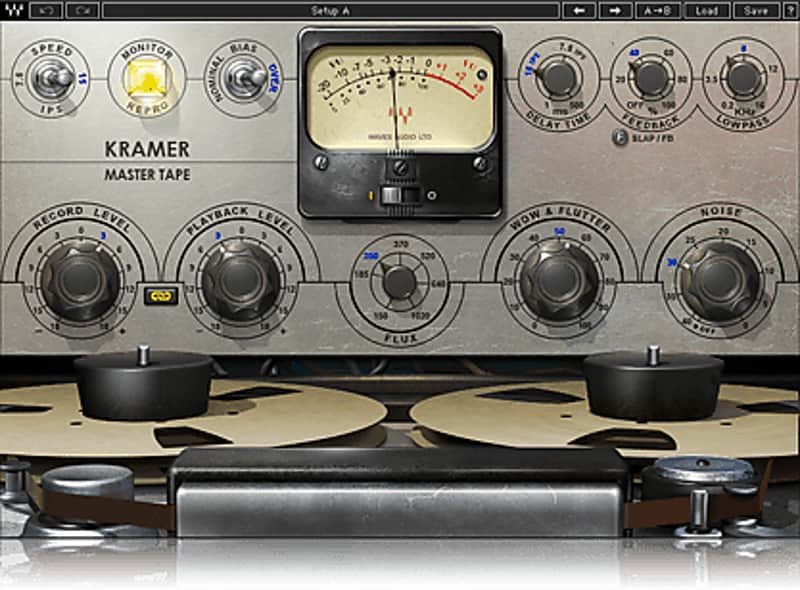
A modeled tape saturation plugin with the blessing of iconic producer and engineer, Eddie Kramer.
How we use it:
Bring the warmth, comfort, and saturation of a vintage tape machine to a sterile recording.
Why it's cool:
Waves and Eddie Kramer provide an esoteric piece from music's past with modern capabilities and reliability. Developed in association with Eddie Kramer, the Kramer Master Tape plugin is modeled on a rare vintage 1/4" reel-to-reel machine. With adjustable tape speed, bias, flux, wow & flutter, and noise parameters, the Kramer Master Tape provides comprehensive control over the contours of your sound. And to top it off, we’ve added a flexible slap & feedback delay, ideal for rock, dance, dub, you name it. For recording, mixing, mastering, and more, bring the richness and warmth of real tape saturation to your DAW with the Kramer Master Tape plugin. It’s the reel deal.
Compatibility
Mac:
CPU
Memory
Operating System
Screen Resolution
Support for Visually Impaired Users
Windows:
CPU
Memory
Operating System
Screen Resolution
Installation Instructions
What it is:
A modeled tape saturation plugin with the blessing of iconic producer and engineer, Eddie Kramer.
How we use it:
Bring the warmth, comfort, and saturation of a vintage tape machine to a sterile recording.
Why it's cool:
Waves and Eddie Kramer provide an esoteric piece from music's past with modern capabilities and reliability. Developed in association with Eddie Kramer, the Kramer Master Tape plugin is modeled on a rare vintage 1/4" reel-to-reel machine. With adjustable tape speed, bias, flux, wow & flutter, and noise parameters, the Kramer Master Tape provides comprehensive control over the contours of your sound. And to top it off, we’ve added a flexible slap & feedback delay, ideal for rock, dance, dub, you name it. For recording, mixing, mastering, and more, bring the richness and warmth of real tape saturation to your DAW with the Kramer Master Tape plugin. It’s the reel deal.
- Modeled tape saturation plugin
- Based on a rare vintage 1/4" reel-to-reel machine
- Adjustable tape speed, bias, flux, wow and flutter, slap / feedback delay
- Developed in association with legendary producer / engineer Eddie Kramer
- As used in London's famed Olympic Studios
Compatibility
Mac:
CPU
- Intel Core i5 / i7 / Xeon
Memory
- 8 GB RAM
- 8 GB free disk space on the system drive
Operating System
- 10.10.5 - 10.12.5
Screen Resolution
- Minimum: 1024x768
- Recommended: 1280x1024 / 1600x1024
- USB displays are not supported as the primary display.
Support for Visually Impaired Users
- Mac OS Sierra 10.12.4
- VoiceOver Utility enabled
- Pro Tools 12.7
- Logic 10.3.1
- Please note: Preset management via the WaveSystem Toolbar is currently not supported (will be added soon).
Windows:
CPU
- Intel Core i3 / i5 / i7 / Xeon / AMD Quad-Core
Memory
- 4 GB RAM
- 8 GB free disk space on the system drive
Operating System
- Windows 7 with SP1 64 bit
- Windows 8.1 64 bit
- Windows 10 64 bit
Screen Resolution
- Minimum: 1024x768
- Recommended: 1280x1024 / 1600x1024
Installation Instructions
- Create an account: https://www.waves.com/create-account (if you have an account, skip this step)
- Register the serial number we emailed: https://www.waves.com/account/register
- Download and install Waves Central for Mac | Windows.
- If you already have Waves Central installed, skip to step 4. - Launch Waves Central.
- Windows: via the desktop shortcut or Start Menu > All Programs > Waves.
- Mac: Applications > Waves Central. - Log into Waves Central using your Waves account information.
- Click on Easy Install & Activate.
- Select the products you wish to install & activate on this computer.
- Click on the Install & Activate button.