Soundtoys Little MicroShift
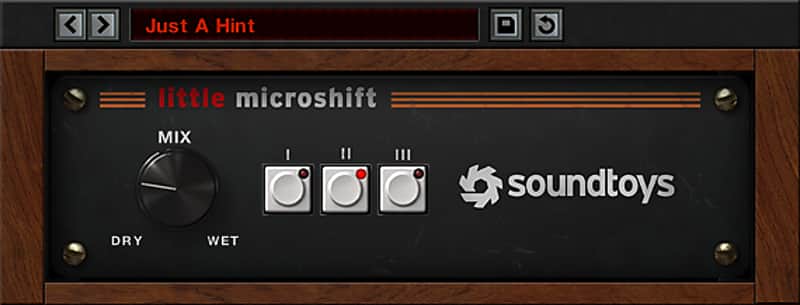

Soundtoys Little MicroShift
This gear has sold
See similar gear from other Reverb sellers

What it is:
A massive vocal stereo widener with classic studio sound.
How we use it:
Make a track sound larger than life.
Why it's cool:
Little MicroShift captures all the quirks of the original units it's based on - so much so that just blending in a little bit to a track makes all the difference.
Need some width for your background vocals? Want to make a lead guitar or synth sound larger than life? Little MicroShift gives you three different flavors of a classic stereo widening trick at the push of a button.
Little MicroShift uses a special recipe of pitch shifting and delay that varies over time to create rich stereo width. It’s incredibly simple to use and perfect for spicing up important instruments, or for blending background vocals subtly into a mix.
We designed Little MicroShift to nail the vibe of sought-after hardware pitch shifters like the Eventide H3000 (which featured algorithms originally designed by Soundtoys’ founders) and the AMS DMX 15-80s.
MicroShift captures the quirks of the originals including saturation and even the different de-glitching algorithms used by these units. So now you can have the big, wide sound of the original hardware with a simple and refined interface that makes getting those tried-and-true sounds faster and easier than ever.
Features
- Widen vocals, lead guitars, synths and more
- Get big sounds fast with an incredibly simple interface
- Create focus for important instruments, or blend them into the background
- Select from 3 different flavors of widening based on sought-after hardware
Compatibility
Plug-in formats (both 32 and 64-bit):
- AAX Native, AAX AudioSuite, VST, and Audio Units (AU)
Supported sample rates:
- Minimum: 44.1 kHz, Maximum: 192 kHz
System requirements:
- Operating systems: Mac OS X 10.8 or later; Windows 7 or later
- An internet connection is required at the time of activation.
Supported host applications:
- Pro Tools (10.3.5 or later), Live, Cubase, Nuendo, Sonar, Logic, Digital Performer
- Click here to view our full list of compatible host applications.
Other requirements:
- iLok.com account (An iLok USB dongle is notrequired. Create a free account here)
Installation Instructions
Activation Instructions
- Download the Soundtoys installer from your Soundtoys account.
- If you already have an account go to: https://www.soundtoys.com/authorize/
- Run the installer on your computer.
- Open your host application (Pro Tools, Logic, etc.), which will scan your plug-ins and prompt you with an activation window.
- Type in your iLok account user ID and password and follow the steps to complete the activation.
- Make some music!
- You will need to have the iLok License Manager (ILM) application installed on your computer. This installs automatically with our Mac installers but is an option in the Windows installers.
- iLok USB keys are optional for all Soundtoys 5 products, but are not required.
- For information on version 4 activation, please click here.
- You can also use the iLok License Manager application to manage Soundtoys licenses.