Sinevibes Robotizer
Price€33.21
Incl. VAT
Instant Download
This listing has ended
See similar gear from other Reverb sellers
Listed:over a month ago
Views:446
Saves:5
Offers:1

Chicago, IL, United States
Our users rate Reverb
Rhythmic audio granulation from the creatives at Sinevibes.
What it is:
A rhythmic audio granulator.
How we use it:
Add musical chaotic movements to a track.
Why it's cool:
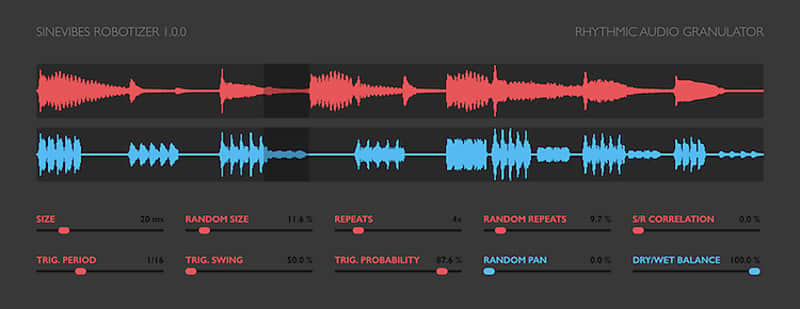
For the knob-tweakers, Robotizer can be controlled with great precision or, for the easy going, Robotizer can be set for endless evolutions and randomized patterns. Robotizer by Sinevibes is a rhythmic audio granulator. It does its thing by continuously recording small grains of audio and repeating them several times, then starting the round again and again. Each granulator round is triggered in a rhythmical fashion via a step sequencer which is tightly synchronized to the host transport. Robotizer's main parameters such as grain size and repeats count have wide adjustments and include intelligent new randomization and correlation features – all this goodness makes this seemingly simple plugin capable of producing "robotic" granular effects, complex strumming and gating, never-repeating stutter patterns – and much beyond. Robotizer is precisely controlled or completely chaotic and endlessly evolving – whatever you set it to do.
Compatibility
Compatibility
Installation Instructions
General Instructions:
What's new?
Robotizer 1.0.2
What it is:
A rhythmic audio granulator.
How we use it:
Add musical chaotic movements to a track.
Why it's cool:
For the knob-tweakers, Robotizer can be controlled with great precision or, for the easy going, Robotizer can be set for endless evolutions and randomized patterns. Robotizer by Sinevibes is a rhythmic audio granulator. It does its thing by continuously recording small grains of audio and repeating them several times, then starting the round again and again. Each granulator round is triggered in a rhythmical fashion via a step sequencer which is tightly synchronized to the host transport. Robotizer's main parameters such as grain size and repeats count have wide adjustments and include intelligent new randomization and correlation features – all this goodness makes this seemingly simple plugin capable of producing "robotic" granular effects, complex strumming and gating, never-repeating stutter patterns – and much beyond. Robotizer is precisely controlled or completely chaotic and endlessly evolving – whatever you set it to do.
Robotizer's graphic interface features real-time waveform displays for dry input and granulator output, giving you a precise picture of how it operates. All elements are color-coded and feature subtle animations, not only aiding your workflow but also making it unusually fun and enjoyable - this is a Sinevibes product, after all.
Sound engine- Real-time audio granulator triggered via a transport-synchronized step sequencer.
- Variable sequencer rate, swing and trigger probability.
- Variable grain size & repeats with correlation feature.
- Intelligent randomization algorithms with natural random number spread.
- Variable hard-left and hard-right granulator pan randomization.
- Color-coded control elements with animated transitions between settings.
- Fully hardware-accelerated rendering with support for Retina screen resolution.
Compatibility
Compatibility
- Works with any application that supports Audio Unit effect plugins.
- Supports OS X 10.6 or later running on 32 or 64 bit Intel Macs.
Installation Instructions
General Instructions:
- We auto-detect your computer operating system, so just click the download button above.
- Find the downloaded plugin (it's in your computer's download folder, or wherever you've chosen to save it) and double click the installer.
- A plugin installer window will open. Simply go through the installation process.
- We will also send you an email with a link to re-download in case you need it.
- If Ableton Live is closed, open it and skip to #5.
- If Ableton Live is already open, go to Preferences.
- Go to Files & Folder.
- Click "Rescan plugins".
- Find the plugin in the Ableton plugins folder in the sidebar.
- Drag-and-drop the plugin onto your track at the bottom of the screen.
- Open Logic Pro X. Newly installed plugins should be detected automatically every time Logic is opened.
- If you've downloaded an effect or utility plugin, these can be used on an insert for any track in the mixer.
- Create a software instrument track if you downloaded a virtual instrument plugin.
- Under Default Patch, go to AU Instruments and choose the plugin you just installed.
- Go to the Reverb SYNC Software and plugin Collection.
- Choose your desired plugin.
- Reverb will auto-detect your platform, so simply click the download button.
- Continue the installation process by following the prompt.
- Hover your mouse over the smart control button.
- Click Show Inspector icon.
- Click on plugins and choose your desired plugin.
What's new?
Robotizer 1.0.2
- Enhanced step sequencer code (also fixes an issue when the first step would not be triggered when starting transport from an arbitrary location).
- The effect now also operates if the host transport is not running.