Kuassa Cerberus Bass Amp
Kuassa Cerberus Bass Amp
This listing has ended
See similar gear from other Reverb sellers

Our users rate Reverb
What it is:
A series of three (valve, FET, and drive) bass amps featuring built-in compression and parametric EQ.
How we use it:
Bring life to a direct bass recording from any genre.
Why it’s cool:
Cerbeus comes with more than enough tonal options to make it a no-brainer for any bassist.Bass Guitar Amplifier
The 3-Head Bass Amp Plugin Goes From Soulful To Tenacious
- Superb Bass Guitar Tone without Fuss!
- 3 amps: Valve, FET, and Drive
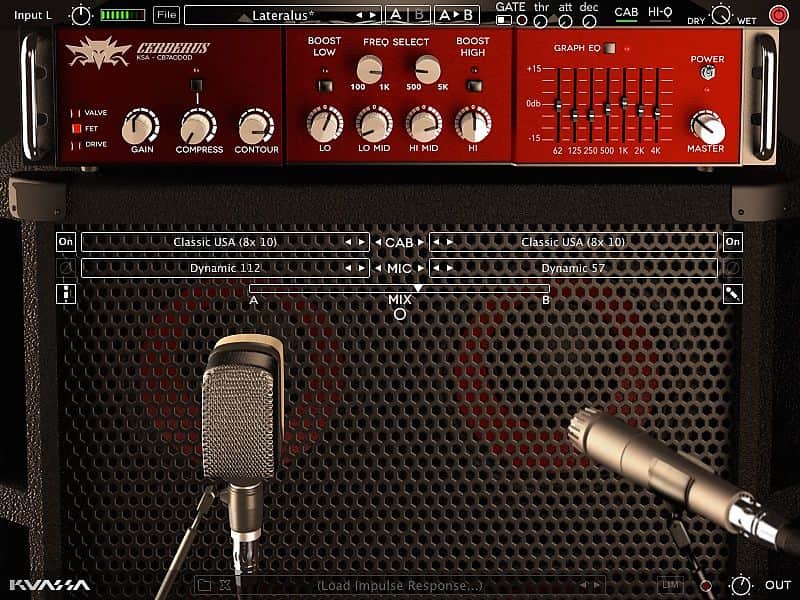
- Extensive sculpting with compressor, contour, parametric EQ, 10-band graphic EQ, and Limiter
- Dual 3D miking placement, and impulse loader
- Phat & Diverse tone options
- Intuitive single-screen controls
Cerberus Bass Amp Supports various audio plugins: VST, VST3, Audio Units, AAX, which are compatible with all kind of Digital Audio Workstation softwares such as Logic Pro, Ableton Live, Reaper, Nuendo, Cubase, Cakewalk, FL Studio, Propellerhead Reason, Avid Pro Tools, and many more.
Cerberus Bass Amplifikation is a three-channel bass amplifier Rack Extension/Plug-in that will deliver thundering lows straight from your computer. With it’s intuitive single screen interface whatever your playing stye is, pick or fingerstyle in any music you play, Cerberus Bass Amplifikation will provide the warmth and mellowness of tube amp, clarity and punch of solid-state power, or turn it up to destruction on the Drive amp type. For further tweaking, Cerberus Bass Amplifikation gives you tonal control through its compressor, contour control, parametric and graphic EQ, and D.I. wetness control. Carefully tuned and carrying enough power to rumble your studio.
Cerberus Bass Amplifikation also comes with features standard to Kuassa’s other amp products; noise gate, and dual cabinet miking modeler.
Cerberus Bass Amplifikation: Take charge of the bottom frequency, directly from your DAW.
Features:
- 3 Amp Types
- Bulit-in Compressor, Noise Gate and Output Limiter
- 3 types of matching cabinets, 6 microphones and Direct Mix
- Freely adjustable dual-miking configurations with mono/stereo options simulation a real-life bass guitar recording session.
- Flexible tone-shaping capability with Contour, Semi-parametric EQ, and Graphic EQ
- External IR loader and move your microphones in 3D space
- Straightforward and easy to use graphic interface.
- Supports up to 96000Hz Sample Rate.
Awards & Testimonials:
“Cerberus is a beast, and not just in name. Prior to trying Cerberus, I had plenty of expectations and Cerberus fulfilled them. I was able to learn the interface very easily and get a tone that made me happy with very little fuss.” - Reason Expert
"I am currently mixing my new CD Peach and am using some of your plugs on it. The bass tones are massive as I am using Cerberus Bass on the tracks. I can’t tell you how big it is making the whole mix. What an incredible plugin. Also, I know we are using some other ones that the studio has.” - Neil Zaza, an instrumental guitarist who has become well known for his technical accuracy and adaptation of classical works by Bach and Mozart into his own blend of neo-classical, melodic, guitar instrumentals.
Compatibility
- Windows XP, Vista, 7, or Later (32/64-bit)
- Mac OS 10.5 or later (32/64-bit)
- VST, VST3, Audio Units or AAX compatible Host Software
Installation Instructions
Redeem Instructions:
We strongly suggest for all users to register to Kuassa Member Area as described below. Your purchased product(s) and their corresponding license(s) will be available there at any time.
When purchased the plugin from Reverb:
- After completing a purchase, the reseller’s system will automatically send you a purchase receipt along with a unique 18-digit [Order ID] with format like this: ABC0000ABC-XXXX-XXXXX
- Download the correct installer for your DAW here: http://kuassa.com/downloads . We supports VST, VST3, Audio Unit and AAX (and Standalone for the Amp Sims), then make sure it runs inside your DAW.
- Visit the Member Area here: https://member.kuassa.com or through the [Support] drop-down menu from the kuassa.com main page
- To gain access, click [register] and fill all the required fields. You don’t need to provide the same credentials as the ones you entered when you do a purchase.
- After registering, our system will automatically send a confirmation email to your inbox containing an [Activation Code]. Simply click the confirmation link provided, or copy the [Activation Code] and paste to the Member Area form.
- You can sign in with the email address and password right after the [Activation Code] is successfully entered.
- Once inside the Member Area, to add your purchased plugins, click on [Register New Product] and enter your [Order ID]. Then download the [License File] which looks like this: ProductName.kuassa
- You can download the License File at any time from your Member Page by clicking on the [Download] button for related product(s).
- Use the [License File] to authorize your Kuassa plug-in using the [File] button on the top left of the plug-in’s interface, then point it to the [License File]
- Done! Visit: http://kuassa.com/redeem or e-mail [email protected] if you need assistance.
Alternative method of authorizing
If you had troubles to authorize the plugin from the DAW, you can manually authorize it by copying the license file and paste it to these folders:
Windows: “Documents/Kuassa/Licenses/”
Default full path: “C:/Users/[username]/Documents/Kuassa/Licenses/”
Mac OSX: “Music/Audio Music Apps/Kuassa/Licenses/”
Default full path: “Macintosh HD//Users/[username]/Music/Audio Music Apps/Kuassa/”
** Only for Amplifikation One
Windows: “C:\Program Files (x86)\Steinberg\Vstplugins\Kuassa\AmplifikationOne Files\”
For 64-bit users, the default location on “C:\Program Files\”
Mac OSX: “Users/[username]/Library/Application Support/Kuassa/”
By default, the User Library folder is hidden. You can access it by opening Finder, click on Go on the top menu and hold the [Option] button. A new “Library” selection will appear.