iZotope Mobius Filter


iZotope Mobius Filter
Nuovo prezzo€38.64
IVA incl.
Download istantaneo
Lo strumento è stato venduto
Vedi strumenti simili di altri venditori Reverb
Pubblicato:più di un mese fa
Visualizzazioni:212
Salvataggi:4
Offerte:1

Chicago, IL, Stati Uniti
I nostri utenti valutano Reverb
Perpetual motion machine.
What it is:
An immersive filtering engine from iZotope.
How we use it:
Craft complex, yet musical spatial movements.
Why it's cool:
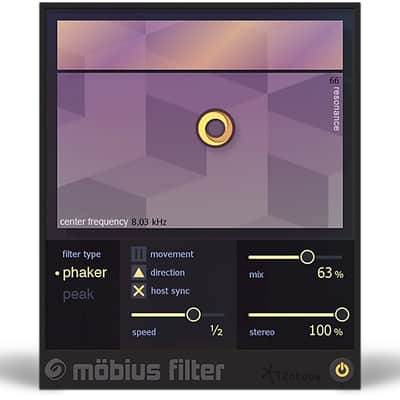
Mobius Filter's X/Y pad interface makes it a breeze to use. Infinite filter potential
Mobius Filter creates the sensation of constant movement in your audio by applying the concept of the Shepard Tone to filters instead of pitches. Depending on your preferences, your audio can rise or fall at varying speeds for complex—but easy to achieve—spatial movement. Combined with automation in your audio editing software, the possibilities with Mobius Filter are endless.
Drag it around
Draw your own expressive sweeps with the X/Y pad, making fluid adjustments to both Center Frequency and Resonance using a single control.
Get in sync
Get a rapid, pulsing effect or slower motion by adjusting the Host Tempo Sync to anything from eighth notes to eight bars.
Immerse yourself
Create an immersive environment with the Stereo slider, which widens the stereo field in an amount of your choosing.
Put it on hold
Create a static filter effect by pausing the filter motion with the Pause function. Or, pause when it feels right and then automate to create custom sweeps.
Phake it out
Change between two filter variations that alter the frequency characteristics of the filter
Compatibility
Operating system requirements
Installation Instructions
What it is:
An immersive filtering engine from iZotope.
How we use it:
Craft complex, yet musical spatial movements.
Why it's cool:
Mobius Filter's X/Y pad interface makes it a breeze to use. Infinite filter potential
Mobius Filter creates the sensation of constant movement in your audio by applying the concept of the Shepard Tone to filters instead of pitches. Depending on your preferences, your audio can rise or fall at varying speeds for complex—but easy to achieve—spatial movement. Combined with automation in your audio editing software, the possibilities with Mobius Filter are endless.
Drag it around
Draw your own expressive sweeps with the X/Y pad, making fluid adjustments to both Center Frequency and Resonance using a single control.
Get in sync
Get a rapid, pulsing effect or slower motion by adjusting the Host Tempo Sync to anything from eighth notes to eight bars.
Immerse yourself
Create an immersive environment with the Stereo slider, which widens the stereo field in an amount of your choosing.
Put it on hold
Create a static filter effect by pausing the filter motion with the Pause function. Or, pause when it feels right and then automate to create custom sweeps.
Phake it out
Change between two filter variations that alter the frequency characteristics of the filter
Compatibility
Operating system requirements
- Windows: 7, 8, and 10
- Mac: OS X 10.8–10.13
- AAX (64-bit), AAX AudioSuite (64-bit), RTAS (32 bit), DPM AudioSuite (32 bit), VST2, VST3, and Audio Unit.
- Pro Tools (10–12.4), Ableton Live (9–9.5), Logic Pro X, Cubase, Studio One, Digital Performer, Reaper, Sonar
Installation Instructions
- Create iZotope account here.
- Navigate to the iZotope Serial Registration tab.
- Paste the serial number emailed to you via Reverb and click "Register Serial."
- Navigate to the Purchase History tab.
- Select "Download Product(s)"
- Locate your iZotope product and click Download.
- Depending on your operating system, click Download for Mac or Download for PC.
- Once downloaded, open the installation file and follow the on-screen instructions.
- Restart or open your DAW and run an instance of your new iZotope plugin.
- You will be prompted by an authorization window.
- Click authorize.
- Enter your license - emailed to you via Reverb - and fill out applicable fields.
- Click submit.
- You're good to go!