Eventide UltraReverb
Price€185.36
Instant Download
This listing has ended
See similar gear from other Reverb sellers
Listed:over a month ago
Views:5,660
Saves:25
Offers:11

Chicago, IL, United States
Our users rate Reverb
Classic Eventide compression, delay, and EQ, with an emphasis on lush, versatile reverb.
What it is:
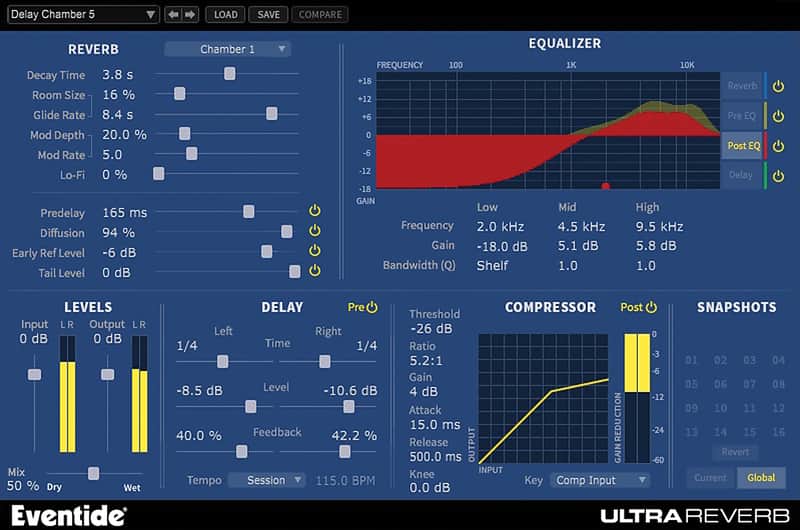
Select legacy reverb algorithms from Eventide's hardware line paired with warm EQ, delay, and compression.
How we use it:
For nearly all of our reverb needs. The ability to sweeten the signal via the other three effects makes UltraReverb a truly comprehensive plugin for all effecting needs.
Why it's cool:
Though it is technically a multi-effect - a phrase known to make some cringe - Eventide did not cut any corners on the quality of the non-reverb channels of UltraReverb. The Lo-Fi slider also drags UltraReverb into the competition for distortion and bit crushing plugins.
The Culmination of More Than 35 Years of Reverb R&D
Features
Compatibility
UltraReverb is compatible with any of the following Digital Audio Workstations running on either Microsoft Windows 7+ or Apple OS X 10.7+
Installation Instructions
Installing and Authorizing Plug-ins -
Before You Begin:
What's new?
2.2.2
-Various internal improvements and bug fixes
2.1.6
-Fixed an issue where plug-in GUI was occasionally laggy on OSX El Capitan
-Added an info button for quick access to the plug-in manual
-Removed "Buss" Category presets, users can now use "Mix Lock" to keep the Wet/Dry mix the same during preset changes.
What it is:
Select legacy reverb algorithms from Eventide's hardware line paired with warm EQ, delay, and compression.
How we use it:
For nearly all of our reverb needs. The ability to sweeten the signal via the other three effects makes UltraReverb a truly comprehensive plugin for all effecting needs.
Why it's cool:
Though it is technically a multi-effect - a phrase known to make some cringe - Eventide did not cut any corners on the quality of the non-reverb channels of UltraReverb. The Lo-Fi slider also drags UltraReverb into the competition for distortion and bit crushing plugins.
The Culmination of More Than 35 Years of Reverb R&D
9 High End Hardware-Based Reverb Algorithms Bundled in a Single Native Plug-in. UltraReverb comes packed with over 300 killer presets and features reverbs from the H8000, compression, EQ and delay integrated for the most flexible reverb plug-in available.
Features
- Halls, Chambers, Rooms, Plates, and Ambience derived from Eventide's flagship hardware processor, the H8000 UltraHarmonizer®
- Create acoustically natural or other-worldly environments
- Packed with over 300 killer presets for mixing, mastering, post production, and sound design
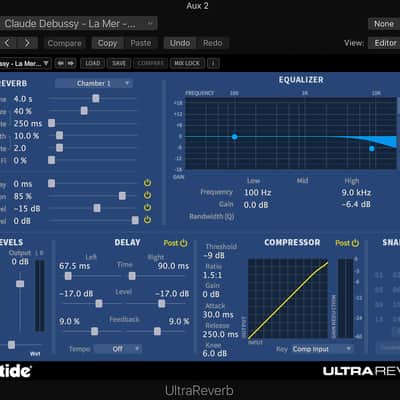
- Includes Artist Presets designed by top engineers and recording professionals
- Session compatible with Eventide Reverb HD/TDM from the Anthology II bundle
- Stereo Delays (pre or post reverb) with Tempo sync to lock delays in time with your session
- Compressor (pre or post reverb) with key input
- Pre-EQ, Post-EQ, Reverb EQ and Delay EQ – Four independent, three band parametric equalizers
- Reverb Tail Randomization based on the legendary H949 Harmonizer® Random setting
- Modulation Rate and Depth controls
- LoFi control for subtle grit or all out mangling
Compatibility
UltraReverb is compatible with any of the following Digital Audio Workstations running on either Microsoft Windows 7+ or Apple OS X 10.7+
- Pro Tools 10+ (AAX Native)
- Cubase 7+ (VST)
- Nuendo (VST)
- Wavelab (VST)
- Logic 8+ (AU)
- Ableton Live 7+ (AU, VST)
- Sonar (VST)
- Studio One (AU, VST)
- Digital Performer (AU)
- Reaper (VST)
- GarageBand (AU)
Installation Instructions
Installing and Authorizing Plug-ins -
Before You Begin:
You will need to provide three pieces of information to complete the authorization and installation process:
iLok.com User ID & License Manager- If you don’t have an ilok.com account, you can create one for free by visiting iLok.com
- Download and install the free iLok License Manager to activate and manage your plug-in licenses.
- If you don't have an Eventide account, Click here to Register.
- A confirmation email will be sent after completion. If you don't see it, check your spam folder.
The Serial Number will be two letters followed by 6 numbers (i.e SR-######). The License Key will be 3 sets of 4 characters, a letter or a number, each; like XXXX-XXXX-XXXX.
- Register your plug-in using your Eventide account, iLok user ID, serial number and license key.
- Find your plug-in license in the iLok License Manager and activate it on your computer.
- Download the plug-in installer and run it on the same computer as your DAW and iLok License Manager.
- Launch your DAW. If you do not see the plug-in, you may need to rescan.
What's new?
2.2.2
-Various internal improvements and bug fixes
2.1.6
-Fixed an issue where plug-in GUI was occasionally laggy on OSX El Capitan
-Added an info button for quick access to the plug-in manual
-Removed "Buss" Category presets, users can now use "Mix Lock" to keep the Wet/Dry mix the same during preset changes.