AudioThing Outer Space
Prix€77.13
TVA incl.
Téléchargement instantané
Cette annonce est terminée
Découvrez du matériel similaire proposé par d'autres vendeurs Reverb
Mis en ligne:il y a plus d'un mois
Vues:38 275
Ajouts aux favoris:251

Chicago, IL, États-Unis
Nos utilisateurs évaluent Reverb
Tape Echo - The echo unit that broke barriers and defined a generation of guitarists.
What it is:
A faithful homage to the tape delays of the early ‘70s.
How we use it:
Bring tape saturation and imperfection to a track.
Why it’s cool:
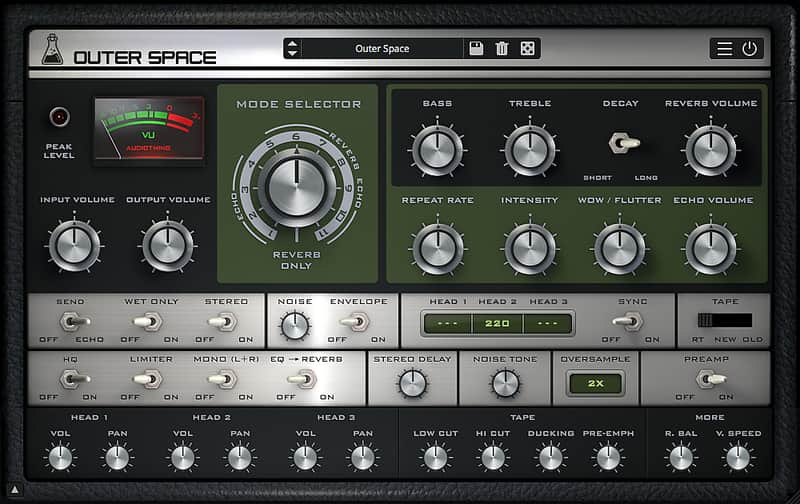
AudioThing presents a maintenance-free solution to the wonderful world of analog.Outer Space is a faithful emulation plugin of a famous vintage tape echo made in the early seventies. As the original unit, Outer Space features an echo section with three playback heads and a spring reverb tank.
We have modelled three different tape frequency responses and saturations, along with all the analog imperfections of tape recording/playback.
We’ve also modelled the ballistic response of the delay rate (repeat rate) which can create eerie pitch shifts (due to the Doppler effect), one of the classic tape echo-based sound effects.
Tape Modelling
We’ve modelled three different tape types. The original RT-1L, a more modern replacement, and an older worn out tape. Each tape will affect the sound in a subtle but different way, especially at higher feedback (Intensity) settings.
WOW/Flutter will also change according to the selected tape, creating different amount of pitch and volume nonlinearities.
Changing the speed of the repetitions (Repeat Rate) will also affect the tape frequency response.
Mode Selector
Just like the original unit, with the Mode selector you can choose 12 different combinations of echo playback heads and reverb (4 Echo only, 7 Echo+Reverb, 1 Reverb only).
Specifications:
Compatibility
Minimal Requirements:
Installation Instructions
Instructions:
- Register your account here: https://www.audiothing.net/account/signup/
- Confirm your email address and log in here: https://www.audiothing.net/account/
- Click on the "Redeem code" page to get the installers and license
How to use installed plugins in Ableton Live: https://www.youtube.com/watch?v=N2VjFjUhlR4
What it is:
A faithful homage to the tape delays of the early ‘70s.
How we use it:
Bring tape saturation and imperfection to a track.
Why it’s cool:
AudioThing presents a maintenance-free solution to the wonderful world of analog.Outer Space is a faithful emulation plugin of a famous vintage tape echo made in the early seventies. As the original unit, Outer Space features an echo section with three playback heads and a spring reverb tank.
We have modelled three different tape frequency responses and saturations, along with all the analog imperfections of tape recording/playback.
We’ve also modelled the ballistic response of the delay rate (repeat rate) which can create eerie pitch shifts (due to the Doppler effect), one of the classic tape echo-based sound effects.
Tape Modelling
We’ve modelled three different tape types. The original RT-1L, a more modern replacement, and an older worn out tape. Each tape will affect the sound in a subtle but different way, especially at higher feedback (Intensity) settings.
WOW/Flutter will also change according to the selected tape, creating different amount of pitch and volume nonlinearities.
Changing the speed of the repetitions (Repeat Rate) will also affect the tape frequency response.
Mode Selector
Just like the original unit, with the Mode selector you can choose 12 different combinations of echo playback heads and reverb (4 Echo only, 7 Echo+Reverb, 1 Reverb only).
Specifications:
- Vintage Tape Echo
- 3 Tape modes: Original, Modern, Old
- Spring Reverb (with short/long Decay)
- Background Noise with Envelope
- Oversample up to 16x
- Preset system with randomizer
- Formats: VST, AU, and AAX (32/64bit)
- Platforms: OSX, Windows
Compatibility
Minimal Requirements:
- Windows: XP SP2 / OSX 10.7
- Mac: Intel Core 2 Duo 2GHz or equivalent
- 2 GB RAM / 500 MB HD
- Screen resolution: 1024×768
- VST2, AU, or AAX 32-bit or 64-bit host
Installation Instructions
Instructions:
- Register your account here: https://www.audiothing.net/account/signup/
- Confirm your email address and log in here: https://www.audiothing.net/account/
- Click on the "Redeem code" page to get the installers and license
How to use installed plugins in Ableton Live: https://www.youtube.com/watch?v=N2VjFjUhlR4
- If Ableton Live is closed, open it and skip to #5.
- If Ableton Live is already open, go to Preferences.
- Go to Files & Folder.
- Click "Rescan plugins".
- Find the plugin in the Ableton plugins folder in the sidebar.
- Drag-and-drop the plugin onto your track at the bottom of the screen.
- Open Logic Pro X. Newly installed plugins should be detected automatically every time Logic is opened.
- If you've downloaded an effect or utility plugin, these can be used on an insert for any track in the mixer.
- Create a software instrument track if you downloaded a virtual instrument plugin.
- Under Default Patch, go to AU Instruments and choose the plugin you just installed.
- Open Pro Tools. Newly installed plugins should be detected automatically every time Pro Tools is opened.
- If you've downloaded an effect or utility plugin, these can be used on an insert for many types of tracks (Audio, Aux, Instrument, Master Fader...)
- If you’ve downloaded a software instrument, create a new Instrument track.
- Navigate to the Mixer and locate the newly created Instrument track.
- Select the desired instrument plugin by clicking on any of the Inserts on the Instrument track.
- Go to the Reverb SYNC Software and plugin Collection.
- Choose your desired plugin.
- Reverb will auto-detect your platform, so simply click the download button.
- Continue the installation process by following the prompt.
- Hover your mouse over the smart control button.
- Click Show Inspector icon.
- Click on plugins and choose your desired plugin.
- To register your plug-in, you should have a valid license file (*.atl).
- Go to https://www.audiothing.net/account/signup/ to register your license.
- Inside the plug-in window, click on the More button and then choose Registration.
- A popup window will open, click on “Load License File…” and locate your license file.
| Marque | |
|---|---|
| Modèle |
|
| Catégories |
Des informations concernant la sécurité des produits peuvent être disponibles ici.