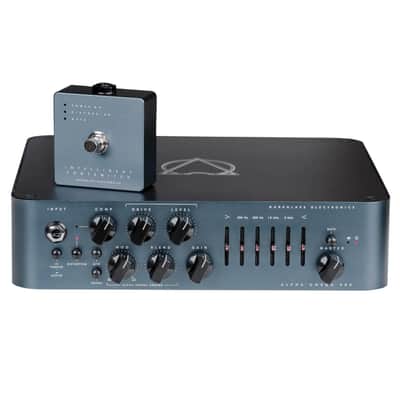
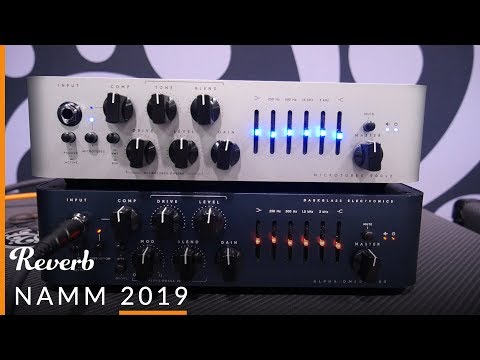
Darkglass Electronics Amplificateur de Basse "Alpha-Omega" 900w
This seller has not set a shipping cost for Ireland. Please contact them to ask about shipping.

Our users rate Reverb
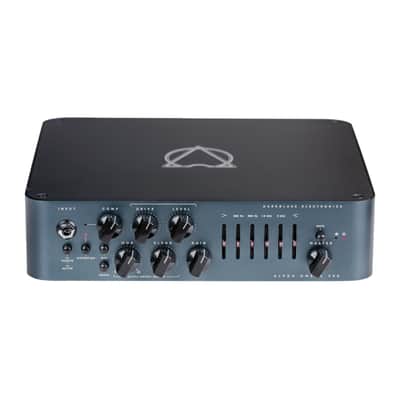
The Alpha Omega 900 takes the best elements of our most successful distortion preamp to date, combined with cutting-edge features to create a monstrous 900-watt amplifier with earth-shattering tone. While Darkglass’ Alpha and Omega drive engines add incredible girth and size to the overdriven signal, the studio-grade VCA compressor adds an extra layer of control, and the ultra-quiet 6-band graphic EQ can help sculpt the sound from aggressive and overdriven to crystal-clear clean, whatever your needs. That’s not all though, MIDI programmability and impulse response cabinet simulation with up to three different storable virtual cabinets make the AO900 not only one of the most complete amplifiers for the touring musician, but combined with the auxiliary input and headphone output, the ideal tool for silent practice. The Alpha Omega 900 amplifies the best qualities of one of the most powerful and distinct Darkglass products ever made.
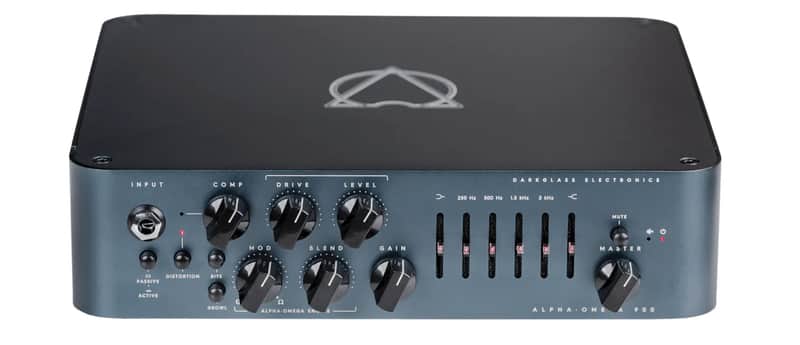
Front Panel Features
INPUT Use this jack to connect your instrument via a standard ¼” mono cable.
ACTIVE/PASSIVE Use this push button to switch from passive to active mode. If your bass is active, it may have a hotter signal causing early distortion of the amp (feel free to use this if such additional distortion is desired).
DISTORTION Use this push button to turn the Alpha Omega Engine™ on or off to add natural compression, organic harmonic enhancement, and saturation ranging from mild overdrive to high-gain bass rage. The Alpha Omega Engine operates before the clean section (so you can use the 6-band active EQ for additional tone shaping).
BITE Boosts the upper mids (2.8 kHz) for added presence and definition.
GROWL Shelving Bass Boost for a fatter sound and increased bass saturation.
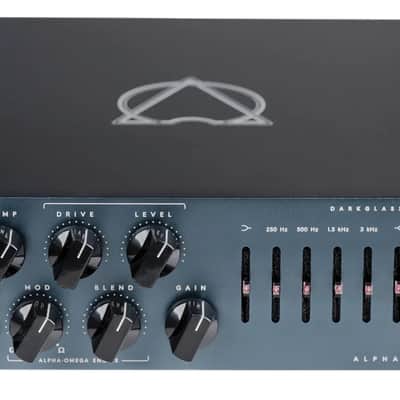
COMPRESSION This knob controls the amount of dynamic compression added to the Alpha Omega Engine. The make-up gain is adjusted automatically. Compression can be turned off or assigned using Darkglass Suite.
DRIVE This knob controls the amount of distortion the Alpha Omega Engine will provide. It will range from a smooth, warm overdrive to a massive, modern distortion sound. LEVEL Use this knob to control the output volume of the Alpha Omega Engine.
BLEND Use this knob to blend the Clean signal with the Distortion signal (Alpha Omega Engine).
MOD Selects or mixes between the two separate distortion circuits: Alpha is punchy, tight with lots of definition, while Omega is simply brutal and raw.
GAIN Use this knob to change the volume of the signal before the active 6-band EQ. You can set it low for the cleanest operation possible or set it higher for a more aggressive growl.
BASS + -12dB at 80Hz. Use this knob to change the low-end content of the signal.
MID + -12dB at 250, 500, 1.5K and 3Khz. This graphic equalizer controls the midrange content of the signal.
TREBLE + -12dB at 5kHz. Use this knob to change the high-end content of the signal.
MASTER Use this knob to control the overall volume of the amplifier.
MUTE Use this pushbutton to mute the amplifier.
DIMENSIONS 26.7 cm l x 7 cm h 25.5 l (10.5" l x 2.75" h x 10" l) / Weight: 2.9 kg (6.39 lb)
CAUTION No user-serviceable parts inside the amplifier. Do not open the amp. Never use the amp in high humidity or near liquids. The Alpha Omega 900 can deliver more than 115 dB of power. Exposure to this level of sound can damage your hearing. Use appropriate hearing protection if exposed. The Alpha Omega 900 can deliver more than 900 watts. Make sure your speaker is capable of delivering this power. You can reduce the output of the amp by selecting the 2Ω mode on the rear panel (through the SpeakON output jack). Do not cover the ventilation holes. The fan and the ventilation holes ventilation holes are part of the amplifier's cooling system. Covering the ventilation holes can damage the power amp by overheating it. · Do not use instrument cables as speaker cables. Instrument cables are not designed to provide the type of power signals sent from the amplifier to the loudspeaker.
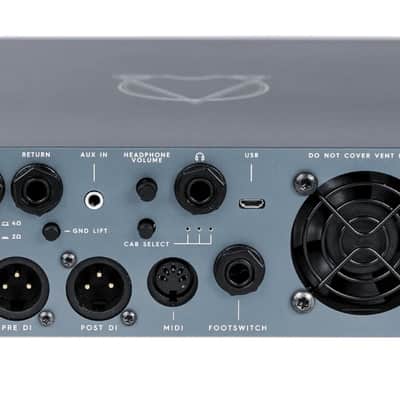
Rear Panel Features
SPEAKER OUT Use this connector to connect the amplifier to your cabinet. This Speakon combination jack allows operation with either Speakon or ¼” speaker cables. The outputs are connected in parallel.
WARNING: Do not useDo not connect an instrument cable to this jack. Using an instrument cable can damage your amplifier.
MINIMUM LOAD Press this switch when using a 2Ω load. You can use this control to lower the output if your 4Ω cabinet is not capable of handling more than 500W (you can also get 350W with an 8Ω cabinet in this configuration).
SEND Use this output to send the signal to effects pedals.
RETURN Use this input to receive the signal from effects pedals. The master volume control is after this input.
GROUND LIFT Use this control to lift the ground of the XLR DI outputs. If you encounter ground noise in your DI signal, try changing the setting of this control.
PRE DI OUT Use this output to send a balanced copy of your input signal to recording equipment, mixer, etc. The output is latency compensated to match the Post DI output
POST DI OUT The signal from this output is taken after the distortion, EQ and effects loop, and processed by the cabinet simulation engine. The output is latency compensated with the Pre DI output and is not affected by the master volume.
USB The USB connector allows you to use the Darkglass suite to load different cabinet impulses or change different parameters on your amp (midi, compressor, etc.).
Headphone Out Connect your headphones and enjoy the impulse response cabinet emulation.
Headphone Volume Controls the volume of the headphone output.
Aux In Use this connector to feed music from your laptop, mobile phone, mp3 player, etc. to the headphone output.
Cabinet Select Toggles between 3 different cabinet impulses and bypasses this section for a rawer sound. Hold this button to enter MIDI Learn Mode to choose the MIDI channel.
MIDI The MIDI input allows you to change channels, switch between mute and compressor, and select the cabinet simulation slot with any standard MIDI device. Program change and control change commands can be used.
Footswitch The Intelligent Footswitch is a unique digitally controlled device that allows you to remotely engage and disengage the Alpha Omega engine. You can also hold the footswitch to mute the amplifier. The distortion pushbutton will remain operational with the Intelligent Pedal connected. You can use a regular mono instrument cable to connect the amplifier to the pedal. You must remove the cable from the footswitch jack on the rear panel if you want to control the amp from the front panel.
AC Power Use this connector to supply electrical power to the amp.
AC Power ON / OFF Use this switch to unleash the audio energy of your bass.
This item is sold As-Described
This item is sold As-Described and cannot be returned unless it arrives in a condition different from how it was described or photographed. Items must be returned in original, as-shipped condition with all original packaging.Learn More.
| Condition | Brand New (New) Brand New items are sold by an authorized dealer or original builder and include all original packaging.Learn more |
|---|---|
| Brand | |
| Model |
|
| Categories | |
| Number of Inputs |
|
| Power Tube Type |
|
| Electronics |
|
| Reverb |
|
| Number of Channels |
|
| Impedance |
|
| Output Power (Watts) |
|
Product safety information may be available here.