Waves Tune Real-Time

Waves Tune Real-Time
New Price€184.98
Instant Download
This gear has sold
See similar gear from other Reverb sellers
Listed:over a month ago
Views:1,360
Saves:12
Offers:12

Chicago, IL, United States
Our users rate Reverb
Feel confident and focused in the studio or on stage.
What it is:
A real-time vocal tuner.
How we use it:
Keep a singer in-tune on the fly.
Why it's cool:
Don't be fooled by Tune's real-time capabilities. You can still dive-in and tweak everything from selected range, which notes to allow or avoid, sensitivity, and even vibrato. A dream tool that helps vocalists stay in tune while singing, feel confident, and focus on the emotion of their performance, in the studio or live on stage.
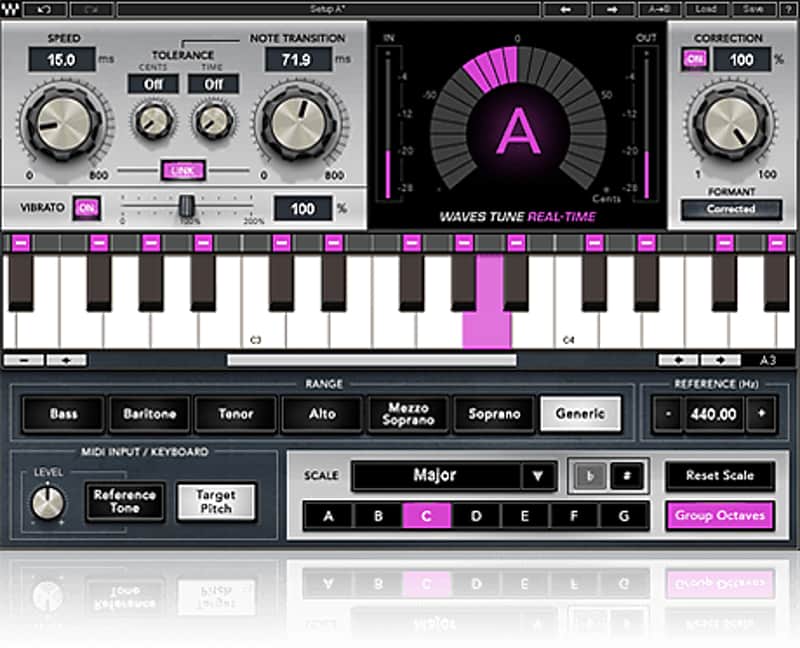
Waves Tune Real-Time provides smooth, natural-sounding vocal pitch correction instantly and automatically, as soon as the notes leave the singer’s mouth. Designed for live performances as well as pre-production, tracking and mixing in the studio, the plugin’s innovative pitch detection and correction technologies ensure that the tuned vocal retains the vocalist’s natural vocal sound. Producers, engineers and performers can use the plugin for subtle pitch correction, but also as a creative pitch quantization effect – all in real time.
The intuitive controls, simple layout, and touchscreen compatibility are key for engineers who have little time to fuss around and need to quickly get solid and "ready-to-go" vocals.
Waves Tune Real-Time can be easily programmed per song and customized to the singer's articulation. You can control the range, choose a scale, mark in advance specific notes to fix or avoid, control the plugin’s sensitivity, and even tune a singer's vibrato while preserving its natural movement. If you don’t know the scale of the song, you can enter the notes using the virtual keyboard, or set the plugin to follow a melody played in advance or in real time via MIDI.
Waves Tune Real-Time is compatible with all Waves SoundGrid applications and eMotion mixers, and can work seamlessly with any live console via MultiRack without the need for complex setups.
Features:
Compatibility
Mac:
CPU
Memory
Operating System
Screen Resolution
Support for Visually Impaired Users
Windows:
CPU
Memory
Operating System
Screen Resolution
Installation Instructions
What it is:
A real-time vocal tuner.
How we use it:
Keep a singer in-tune on the fly.
Why it's cool:
Don't be fooled by Tune's real-time capabilities. You can still dive-in and tweak everything from selected range, which notes to allow or avoid, sensitivity, and even vibrato. A dream tool that helps vocalists stay in tune while singing, feel confident, and focus on the emotion of their performance, in the studio or live on stage.
Waves Tune Real-Time provides smooth, natural-sounding vocal pitch correction instantly and automatically, as soon as the notes leave the singer’s mouth. Designed for live performances as well as pre-production, tracking and mixing in the studio, the plugin’s innovative pitch detection and correction technologies ensure that the tuned vocal retains the vocalist’s natural vocal sound. Producers, engineers and performers can use the plugin for subtle pitch correction, but also as a creative pitch quantization effect – all in real time.
The intuitive controls, simple layout, and touchscreen compatibility are key for engineers who have little time to fuss around and need to quickly get solid and "ready-to-go" vocals.
Waves Tune Real-Time can be easily programmed per song and customized to the singer's articulation. You can control the range, choose a scale, mark in advance specific notes to fix or avoid, control the plugin’s sensitivity, and even tune a singer's vibrato while preserving its natural movement. If you don’t know the scale of the song, you can enter the notes using the virtual keyboard, or set the plugin to follow a melody played in advance or in real time via MIDI.
Waves Tune Real-Time is compatible with all Waves SoundGrid applications and eMotion mixers, and can work seamlessly with any live console via MultiRack without the need for complex setups.
Features:
- Automatically tunes vocals in real time
- Ultra-low latency for instant response
- Optimized for both studio and live settings
- Advanced formant correction to retain natural vocal sound
- Corrects vibrato while preserving its natural movement
- Creative pitch quantization effects
- Program or play the pitch correction via MIDI
- Runs on any live mixing console via MultiRack SoundGrid
- Compatible with all SoundGrid applications: StudioRack, MultiRack, eMotion ST, eMotion LV1
Compatibility
Mac:
CPU
- Intel Core i5 / i7 / Xeon
Memory
- 8 GB RAM
- 8 GB free disk space on the system drive
Operating System
- 10.10.5 - 10.12.5
Screen Resolution
- Minimum: 1024x768
- Recommended: 1280x1024 / 1600x1024
- USB displays are not supported as the primary display.
Support for Visually Impaired Users
- Mac OS Sierra 10.12.4
- VoiceOver Utility enabled
- Pro Tools 12.7
- Logic 10.3.1
- Please note: Preset management via the WaveSystem Toolbar is currently not supported (will be added soon).
Windows:
CPU
- Intel Core i3 / i5 / i7 / Xeon / AMD Quad-Core
Memory
- 4 GB RAM
- 8 GB free disk space on the system drive
Operating System
- Windows 7 with SP1 64 bit
- Windows 8.1 64 bit
- Windows 10 64 bit
Screen Resolution
- Minimum: 1024x768
- Recommended: 1280x1024 / 1600x1024
Installation Instructions
- Create an account: https://www.waves.com/create-account (if you have an account, skip this step)
- Register the serial number we emailed: https://www.waves.com/account/register
- Download and install Waves Central for Mac | Windows.
- If you already have Waves Central installed, skip to step 4. - Launch Waves Central.
- Windows: via the desktop shortcut or Start Menu > All Programs > Waves.
- Mac: Applications > Waves Central. - Log into Waves Central using your Waves account information.
- Click on Easy Install & Activate.
- Select the products you wish to install & activate on this computer.
- Click on the Install & Activate button.