
Waves Abbey Road Studio 3
Prezzo€108.51
IVA incl.
Download istantaneo
Lo strumento è stato venduto
Vedi strumenti simili di altri venditori Reverb
Pubblicato:più di un mese fa
Visualizzazioni:2.945
Follower:27

Chicago, IL, Stati Uniti
I nostri utenti valutano Reverb
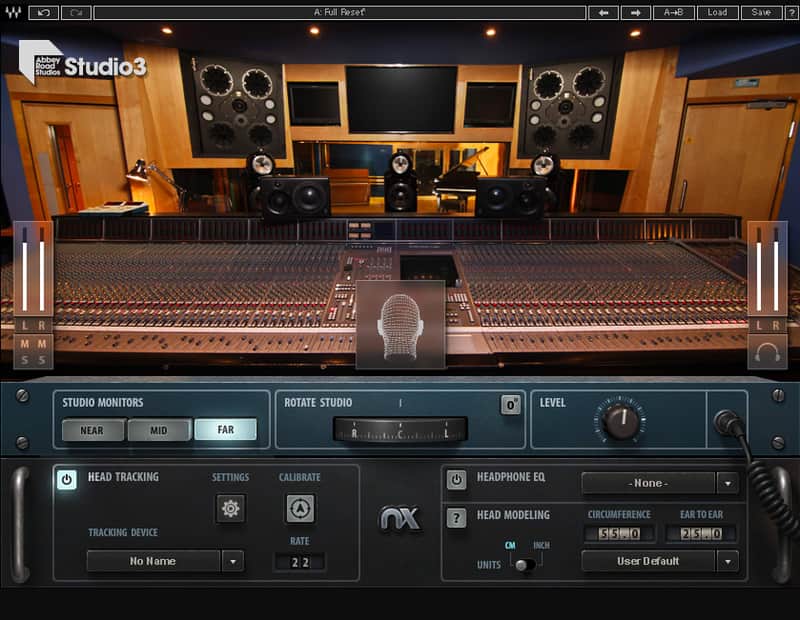
The Abbey Road Studio 3 plugin brings the acoustic environment of the legendary Abbey Road Studio 3 control room to your headphones, so you can always trust the production and mixing decisions you are making.
For the first time ever, you can produce, mix and hear music inside the world’s greatest studio control room—no matter where you really are.
Contemporary mixes and remixes of the Beatles and Pink Floyd. Modern classics by Radiohead, Amy Winehouse and Kanye West. #1 chart toppers by Frank Ocean, Lady Gaga, and Florence + the Machine. All were made and perfected at Abbey Road Studio 3.
The plugin recreates—in glorious three-dimensional sound over any set of headphones—the same stellar audio qualities that make Studio 3 the perfect acoustic environment for music mixing and production:
Compatibility
MAC:
CPU
Intel Core i5 / i7 / Xeon
Memory
8 GB RAM
8 GB free disk space on the system drive
Operating System
10.11.6 - 10.14.5
Screen Resolution
Minimum: 1024x768
Recommended: 1280x1024 / 1600x1024
USB displays are not supported as the primary display.
Support for Visually Impaired Users
Mac OS Sierra 10.12.4
VoiceOver Utility enabled
Pro Tools 12.7
Logic 10.3.1
Please note: Waves Central and preset management via the WaveSystem Toolbar are currently not supported.
____
WINDOWS
CPU
Intel Core i3 / i5 / i7 / Xeon / AMD Quad-Core
Memory
8 GB RAM
8 GB free disk space on the system drive
Operating System
Windows 7 with SP1 64 bit
Windows 8.1 64 bit
Windows 10 64 bit
Screen Resolution
Minimum: 1024x768
Recommended: 1280x1024 / 1600x1024
Installation Instructions
For the first time ever, you can produce, mix and hear music inside the world’s greatest studio control room—no matter where you really are.
Abbey Road Studio 3: The Perfect Control Room
The Abbey Road Studio 3 control room is Abbey Road Studios’ flagship mix room, designed by the world’s greatest acousticians to provide the ultimate music production and mixing environment.Contemporary mixes and remixes of the Beatles and Pink Floyd. Modern classics by Radiohead, Amy Winehouse and Kanye West. #1 chart toppers by Frank Ocean, Lady Gaga, and Florence + the Machine. All were made and perfected at Abbey Road Studio 3.
Stellar Acoustics Recreated on Headphones
The Waves Abbey Road Studio 3 plugin is based on precision 360° impulse response measurements of the Studio 3 control room, combined with Waves’ pioneering Nx technology for immersive spatial audio.The plugin recreates—in glorious three-dimensional sound over any set of headphones—the same stellar audio qualities that make Studio 3 the perfect acoustic environment for music mixing and production:
- The same supreme clarity of stereo and surround image
- The same acoustic response unveiling every detail in your sessions
- The same well-balanced sustain across the full frequency spectrum
- The same accurate low-end sustain—a hallmark of the world’s best studio control rooms
- The same combination of impeccable room acoustics and state-of-the-art near-field, mid-field and far-field speakers
Produce and Mix with Greater Confidence
With the Abbey Road Studio 3 plugin:- You have the ultimate reference environment on headphones
- You can better judge mix depth, panning, reverb, low end response and more, over any pair of headphones
- You can better predict how your headphone sessions will translate to speaker systems of all types
Perfect Reference—Anywhere, Anytime
Abbey Road Studio 3 is useful in a wide range of scenarios:- If you don’t have a perfectly treated mix room—now you do.
- If you do have a great room—now you have the world’s best control room for extra reference.
- If you’re on the go—you can take Abbey Road Studio 3 with you.
- If you collaborate with others—now you all have the same acoustic environment to refer to when sending sessions back and forth.
- If you need to create a 5.1 or 7.1 mix without access to a full set of surround speakers—now you can do so on headphones, before going into a surround studio for final tweaks.
Compatibility
MAC:
CPU
Intel Core i5 / i7 / Xeon
Memory
8 GB RAM
8 GB free disk space on the system drive
Operating System
10.11.6 - 10.14.5
Screen Resolution
Minimum: 1024x768
Recommended: 1280x1024 / 1600x1024
USB displays are not supported as the primary display.
Support for Visually Impaired Users
Mac OS Sierra 10.12.4
VoiceOver Utility enabled
Pro Tools 12.7
Logic 10.3.1
Please note: Waves Central and preset management via the WaveSystem Toolbar are currently not supported.
____
WINDOWS
CPU
Intel Core i3 / i5 / i7 / Xeon / AMD Quad-Core
Memory
8 GB RAM
8 GB free disk space on the system drive
Operating System
Windows 7 with SP1 64 bit
Windows 8.1 64 bit
Windows 10 64 bit
Screen Resolution
Minimum: 1024x768
Recommended: 1280x1024 / 1600x1024
Installation Instructions
- Create an account: https://www.waves.com/create-account (if you have an account, skip this step)
- Register the serial number we emailed: https://www.waves.com/account/register
- Download and install Waves Central for Mac | Windows.
- If you already have Waves Central installed, skip to step 4. - Launch Waves Central.
- Windows: via the desktop shortcut or Start Menu > All Programs > Waves.
- Mac: Applications > Waves Central. - Log into Waves Central using your Waves account information.
- Click on Easy Install & Activate.
- Select the products you wish to install & activate on this computer.
- Click on the Install & Activate button.