AudioThing SR-88
Price€30.48
Incl. VAT
Instant Download
This listing has ended
See similar gear from other Reverb sellers
Listed:over a month ago
Views:3,060
Watchers:25
Offers:3

Chicago, IL, United States
Our users rate Reverb
80s Analog Drum Machine - Add that analog element with this wonderfully useful emulation of a rare ‘80s drum box.
What it is:
A sample-based plugin emulation of the rare analog Sound Master Memory Rhythm SR-88.
How we use it:
To add that vintage aesthetic and groove to a track.
Why it’s cool:
Filter and Effects sections give the SR-88 a unique leverage over other drum machine VSTs.SR-88 is a sample-based plugin emulation of the Sound Master Memory Rhythm SR-88, a rare analog drum machine from the 80s.
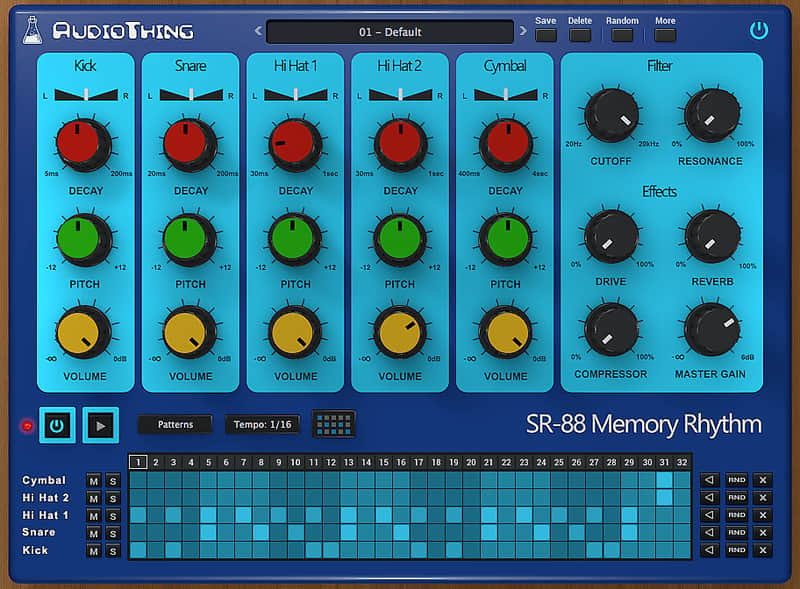
The instrument features 5 classic analog sounds: Kick, Snare, Hi Hat 1, Hi Hat 2, and Cymbal, which can be pitched, panned or mixed independently. You can additionally shape the sound with the Low Pass Filter (Zero Delay Feedback), Overdrive, Compressor and Reverb. The sequencer lets you easily build patterns that can be dragged and dropped to your DAW/host.
Specifications:
Compatibility
Minimal Requirements:
Installation Instructions
Instructions:
- Register your account here: https://www.audiothing.net/account/signup/
- Confirm your email address and log in here: https://www.audiothing.net/account/
- Click on the "Redeem code" page to get the installers and license
How to use installed plugins in Ableton Live: https://www.youtube.com/watch?v=N2VjFjUhlR4
What it is:
A sample-based plugin emulation of the rare analog Sound Master Memory Rhythm SR-88.
How we use it:
To add that vintage aesthetic and groove to a track.
Why it’s cool:
Filter and Effects sections give the SR-88 a unique leverage over other drum machine VSTs.SR-88 is a sample-based plugin emulation of the Sound Master Memory Rhythm SR-88, a rare analog drum machine from the 80s.
The instrument features 5 classic analog sounds: Kick, Snare, Hi Hat 1, Hi Hat 2, and Cymbal, which can be pitched, panned or mixed independently. You can additionally shape the sound with the Low Pass Filter (Zero Delay Feedback), Overdrive, Compressor and Reverb. The sequencer lets you easily build patterns that can be dragged and dropped to your DAW/host.
Specifications:
- 5 classic analog drum sounds
- 15 Factory Presets / 15 Factory Patterns
- Low Pass filter with Zero Delay Feedback
- Overdrive, Compressor, and Reverb Effects
- Sequencer with MIDI Drag to DAW
- Preset system with randomizer
- Size: MAC 158 MB / PC 110 MB
- Formats: VST, AU, and AAX (32/64bit)
- Platforms: OSX, Windows
Compatibility
Minimal Requirements:
- Windows 7, 8, 10 (64 bit) Intel Core 2 Duo or AMD Athlon 64 X2, 4 GB RAM
VST2, VST3, or AAX, 64-bit host
OS X 10.7 – macOS 10.15
Intel Core 2 Duo, 2 GB RAM
VST2, VST3, AU, or AAX, 64-bit host
Installation Instructions
Instructions:
- Register your account here: https://www.audiothing.net/account/signup/
- Confirm your email address and log in here: https://www.audiothing.net/account/
- Click on the "Redeem code" page to get the installers and license
How to use installed plugins in Ableton Live: https://www.youtube.com/watch?v=N2VjFjUhlR4
- If Ableton Live is closed, open it and skip to #5.
- If Ableton Live is already open, go to Preferences.
- Go to Files & Folder.
- Click "Rescan plugins".
- Find the plugin in the Ableton plugins folder in the sidebar.
- Drag-and-drop the plugin onto your track at the bottom of the screen.
- Open Logic Pro X. Newly installed plugins should be detected automatically every time Logic is opened.
- If you've downloaded an effect or utility plugin, these can be used on an insert for any track in the mixer.
- Create a software instrument track if you downloaded a virtual instrument plugin.
- Under Default Patch, go to AU Instruments and choose the plugin you just installed.
- Open Pro Tools. Newly installed plugins should be detected automatically every time Pro Tools is opened.
- If you've downloaded an effect or utility plugin, these can be used on an insert for many types of tracks (Audio, Aux, Instrument, Master Fader...)
- If you’ve downloaded a software instrument, create a new Instrument track.
- Navigate to the Mixer and locate the newly created Instrument track.
- Select the desired instrument plugin by clicking on any of the Inserts on the Instrument track.
- Go to the Reverb SYNC Software and plugin Collection.
- Choose your desired plugin.
- Reverb will auto-detect your platform, so simply click the download button.
- Continue the installation process by following the prompt.
- Hover your mouse over the smart control button.
- Click Show Inspector icon.
- Click on plugins and choose your desired plugin.
- To register your plug-in, you should have a valid license file (*.atl).
- Go to https://www.audiothing.net/account/signup/ to register your license.
- Inside the plug-in window, click on the More button and then choose Registration.
- A popup window will open, click on “Load License File…” and locate your license file.
| Brand | |
|---|---|
| Model |
|
| Categories |
Product safety information may be available here.