
Cableguys PanCake Auto-Panner
PreisGRATIS
inkl. MwSt.
Sofortiger Download
Diess Inserat wurde beendet.
Ähnliches Equipment von anderen Reverb-Verkäufern ansehen
Inseriert:vor über einem Monat
Aufrufe:3.803
Mal gespeichert:27
Downloads:3.824

Chicago, IL, Vereinigte Staaten von Amerika
Unsere Benutzer bewerten Reverb
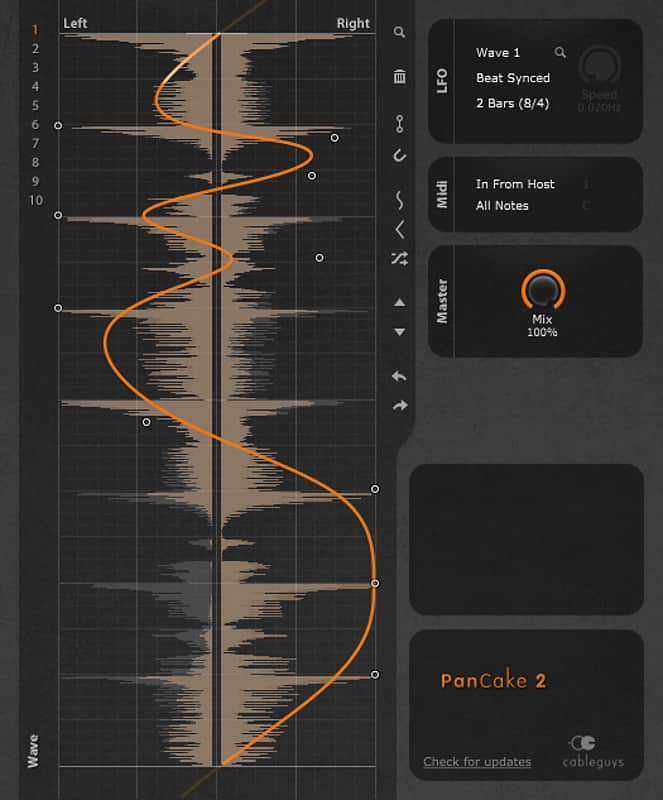
Flexible auto panning effect limited only to what you can draw.
What it is:
A peculiar effect that bounces instrument signals between the left and right speakers.
How we use it:
To emulate the unique sound of an echo drifting through winding caverns.
Why it's cool:
Visual display of stereo field and clickable waveform provides total control of sound direction.
Compatibility
Windows:
Mac:
Installation Instructions
General Instructions:
How to install plugins in Ableton Live:
What it is:
A peculiar effect that bounces instrument signals between the left and right speakers.
How we use it:
To emulate the unique sound of an echo drifting through winding caverns.
Why it's cool:
Visual display of stereo field and clickable waveform provides total control of sound direction.
A wacky, customizable, over-the-top stereo panner taken to loony extremes.
You can construct your own modulation curves. They can be easily drawn using soft or hard control points, thus producing gentle transitions or sharp bends in the waveform.
PanCake's LFO can be beat-synced to your DAW, from a fast 1/128 note modulation up to 32 bars. It can also be set free-running from 0.02 Hz to 5.24 kHz, and can be triggered vie MIDI.
A precise display of channel left/right volume provides helpful visual control.
Compatibility
Windows:
- 2 GHz CPU with SSE2 support
- Windows 7, 8 or 10
- VST host sequencer
- 32- or 64-bit
Mac:
- 2 GHz Intel CPU
- Mac OS X 10.8 or later
- VST or AU host sequencer
- 32- or 64-bit
Installation Instructions
General Instructions:
- We auto-detect your computer operating system, so just click the download button above
- Find the downloaded plugin (it’s in your computer’s download folder) and double click it
- A plugin installer window will open, so go through the installation process
- We will also send you an email with a link to re-download in case you need it
How to install plugins in Ableton Live:
- If Ableton is closed, open it and skip to #5
- If Ableton is already open, go to Preferences
- Go to Files & Folder
- Click “Rescan plugins”
- Find the plugin in the Ableton plugins folder in the sidebar
- Drag-and-drop the plugin onto your track at the bottom of the screen
- Open Logic Pro X
- Create a software instrument track if you downloaded a virtual instrument plugin
- Under Default Patch, go to AU Instruments and choose the plugin you just installed
- If you downloaded an effect or utility plugin, you can insert them on the mixer
| Marke | |
|---|---|
| Modell |
|
| Kategorien |
Möglicherweise sind hier Informationen zur Produktsicherheit verfügbar.